The EPUB Is Fine, the Styling Is Broken
How to Take Back Control on Android

ไฟล์ EPUB ไม่ได้เสีย แต่สไตล์หนังสือพัง
วิธีปรับแต่งและควบคุมการแสดงผลบน Android ด้วยตัวเอง

EPUBは壊れていない、崩れているのはスタイルだ
Androidで電子書籍のレイアウトを取り戻す方法

EPUB 没坏,坏的是排版样式
如何在 Android 上夺回电子书排版与字体的控制权

O EPUB Está Perfeito, o Estilo É que Está Quebrado
Como Retomar o Controle da Leitura no Android

El EPUB Está Bien, lo que Falla Es el Estilo
Cómo Recuperar el Control de la Lectura en Android

🎨

You download a free EPUB, open it on your phone, and the text is a smear of grey on a black page. Or the letters are half the size you set. Or every line is stretched into rivers of white space. You change the font size in your reader and nothing happens.

The file is not corrupt, and your reader is not ignoring you. An EPUB is a small website in a box: it ships its own stylesheet, and that stylesheet can pin the text colour, the font, the alignment and the spacing. When the book's own styling was written for a white page and you read on a dark one, the result is a page you cannot read.

Shiori lets you overrule the file. This guide shows the four switches that do it, what each one actually changes, and the order to try them in.

🎨
Remove Font Color
🚫
Disable EPUB Styles
🔤
Force Reader Fonts
🌓
Auto Contrast

Why a book can look broken

Three habits in EPUB stylesheets cause almost all of it:

  • A hard-coded text colour: The file says "text is nearly black" because it assumed a white page. Switch to a dark theme and the text disappears into the background.
  • A hard-coded font and size: The file names its own font — sometimes embedded, sometimes missing on your phone — and states a size relative to nothing useful.
  • Justification with no hyphenation: Text stretched to both margins on a narrow phone screen opens huge gaps between words that drag your eye down the page.
SwitchWhat It DoesWhen to Use
Remove font colorDiscards hardcoded font colours; uses theme text colourText is black-on-black or unreadable in Dark/Sepia
Auto contrastIntelligently adjusts book colours for readabilityWhen you want to preserve coloured headings or notes
Disable EPUB stylesIgnores publisher CSS layout, margins, and indentsWhen font size/line height settings are ignored
Force reader fontsReplaces embedded book fonts with your selected fontWhen the book font is blurry or missing glyphs
Clean hidden stringsCleans up hidden junk markup left inside the textWhen stray code symbols show up or TTS stumbles
Safe & Non-destructive:
Nothing here modifies your original book file. Every switch changes only how Shiori renders the book, so you can turn them off anytime to restore the publisher's styling.

เคยไหมเวลาดาวน์โหลดไฟล์ EPUB มาเปิดอ่านบนมือถือ แล้วพบว่าตัวหนังสือกลืนหายไปกับพื้นหลังสีดำ หรือตัวหนังสือเล็กจิ๋วปรับขนาดเท่าไหร่ก็ไม่เปลี่ยน หรือเว้นวรรคคำกระจัดกระจายจนอ่านแทบไม่รู้เรื่อง

ไฟล์หนังสือไม่ได้เสียหาย และแอปอ่านไม่ได้รวนครับ แต่ความจริงคือไฟล์ EPUB มีโครงสร้างคล้าย "หน้าเว็บไซต์ย่อส่วน" ซึ่งมาพร้อมไฟล์สไตล์ชีท (CSS) ของผู้จัดพิมพ์เอง หากผู้จัดพิมพ์ระบุสีตัวอักษรเป็นสีดำตายตัว เมื่อคุณเปิดอ่านด้วยโหมดกลางคืน (Dark Theme) ตัวหนังสือจึงกลืนไปกับพื้นหลัง

Shiori ออกแบบมาพร้อมฟังก์ชันปลดล็อกการควบคุมสไตล์หนังสือให้คุณปรับแต่งได้ตามใจชอบ คู่มือนี้จะแนะนำ 4 สวิตช์สำคัญที่จะช่วยแก้ปัญหานี้ให้หมดไปอย่างง่ายดาย

🎨
ลบสีฟอนต์ต้นฉบับ
🚫
ปิดสไตล์ EPUB
🔤
บังคับใช้ฟอนต์ระบบ
🌓
คอนทราสต์อัตโนมัติ

สาเหตุที่ทำให้หน้าหนังสือแสดงผลเพี้ยน

ปัญหาการแสดงผลส่วนใหญ่เกิดจาก 3 สาเหตุหลักในไฟล์ต้นฉบับ:

  • กำหนดสีตัวอักษรตายตัว (Hard-coded Color): ไฟล์ระบุสีข้อความเป็นสีดำเพราะคิดว่าผู้อ่านจะเปิดบนหน้าจอสีขาว เมื่อสลับเป็นธีมมืด ตัวหนังสือจึงกลืนหายไปกับพื้นหลัง
  • ระบุชื่อฟอนต์และขนาดตายตัว: หนังสือบางเล่มฝังฟอนต์เฉพาะที่เครื่องไม่มี หรือกำหนดขนาดเป็นพิกเซล ทำให้ปุ่มปรับขนาดตัวอักษรของแอปไม่ทำงาน
  • กระจายข้อความชิดขอบซ้าย-ขวา (Justify): เมื่อเปิดอ่านบนจอมือถือที่หน้าจอแคบ จะเกิดช่องว่างระหว่างคำขนาดใหญ่จนอ่านสะดุด
สวิตช์ควบคุมหน้าที่การทำงานกรณีที่ควรเปิดใช้งาน
Remove font color (ลบสีฟอนต์)ตัดสีข้อความที่ฝังมา แล้วใช้สีตามธีมของแอปเมื่อเปิดธีมมืดหรือซีเปียแล้วตัวหนังสือกลืนกับพื้นหลัง
Auto contrast (ปรับคอนทราสต์)คงสีเดิมไว้ แต่ปรับระดับความสว่างให้อ่านออกหนังสือที่มีหัวข้อหลากสีหรือตำราเรียนที่ต้องการเน้นสี
Disable EPUB styles (ปิด CSS หนังสือ)ยกเลิกสไตล์การจัดหน้าและระยะขอบของหนังสือทั้งหมดเมื่อปรับขนาดตัวอักษรหรือระยะห่างบรรทัดแล้วไม่เปลี่ยน
Force reader fonts (บังคับใช้ฟอนต์)แทนที่ฟอนต์ที่ฝังมาด้วยฟอนต์ที่คุณเลือกในแอปเมื่อฟอนต์เดิมอ่านยาก สระลอย หรือไม่มีภาษาไทย
Clean hidden strings (ล้างโค้ดขยะ)ทำความสะอาดแท็กโค้ดหรือสัญลักษณ์แปลกปลอมในเนื้อหาเมื่อมีตัวอักษรประหลาดโผล่ขึ้นมา หรือเสียง TTS อ่านสะดุด
ปลอดภัย ไม่กระทบไฟล์ต้นฉบับ:
สวิตช์เหล่านี้ควบคุมเฉพาะการเรนเดอร์แสดงผลบนหน้าจอของ Shiori เท่านั้น ไฟล์ EPUB ต้นฉบับในเครื่องของคุณจะไม่ถูกแก้ไขหรือเปลี่ยนแปลงใดๆ ทั้งสิ้น

無料のEPUBをダウンロードしてスマートフォンで開いたとき、ダークテーマなのに文字が黒くて読めなかったり、文字サイズを変更しても反映されなかったり、単語間の空白が不自然に広がっていたりした経験はありませんか?

ファイルが壊れているわけでも、リーダーが不具合を起こしているわけでもありません。EPUBは内部に独自のスタイルシート(CSS)を持っています。制作者が白い背景を前提にして文字色を黒に固定していると、ダークモードにした際に文字が背景と同化してしまいます。

Shioriなら、本のスタイルシートを上書きして自分好みの快適な読書環境を取り戻せます。本ガイドでは4つの主要な切り替えスイッチの使い方を詳しく解説します。

🎨
文字色をクリア
🚫
EPUBスタイル無効化
🔤
指定フォント強制
🌓
自動コントラスト

本が崩れて見える主な原因

  • 文字色の固定指定: 白背景前提で文字色が指定されているため、ダークテーマで背景と同化して読めなくなります。
  • フォントやサイズが固定されている: 埋め込みフォントや絶対指定サイズにより、リーダー側のサイズ調整が効きません。
  • 両端揃えによる極端な余白: 画面幅の狭いスマホで無理に両端を揃えようとして単語間に巨大な空白が生じます。
スイッチ機能使用する場面
Remove font color固定された文字色を解除し、テーマ色を適用ダークやセピアで文字が読みにくい場合
Auto contrast元の色味を保ちつつ視認性を自動補正見出しの色分けなどを保持したい場合
Disable EPUB styles書籍側のCSSを破棄しアプリ標準で統一文字サイズや行間設定が反映されない場合
Force reader fonts埋め込みフォントをアプリで指定したフォントに置換文字の表示が乱れる、好みのフォントで読みたい場合
Clean hidden strings不要な非表示タグやゴミ文字を自動クリーニング余計な記号が表示されたりTTSが引っかかる場合
元のファイルは無傷で安心:
これらの設定はShiori内部での描画時のみ適用されます。端末に保存されている元のEPUBファイル自体が書き換えられることはありません。

你是否遇到过这样的情况:下载了一本免费的 EPUB 电子书,在手机上打开却发现深色模式下文字几乎隐形?或者无论怎么调整字号字体大小都纹丝不动?甚至排版两侧对齐留出了巨大的单词空白?

这并非文件损坏,也不是阅读器出故障。EPUB 本质上是一个打包的网页,自带出版社的样式表(CSS)。当原始样式锁死了文字颜色和字号,而在深色背景下阅读时,就会出现严重的显示冲突。

Shiori 赋予您完全覆盖书籍样式的能力。本文将为您详细介绍 4 个关键的样式覆盖开关及其使用场景。

🎨
移除固定字体颜色
🚫
禁用图书 EPUB 样式
🔤
强制使用阅读器字体
🌓
智能自动对比度

导致图书排版混乱的罪魁祸首

  • 写死的字体颜色: 出版社预设了黑色字体,导致切换深色主题时文字隐入背景。
  • 锁死字体与字号: 强制使用未适配手机的内嵌字体或绝对像素单位,导致阅读器字号缩放失效。
  • 无断字的两端对齐: 在狭窄的手机屏幕上强行两端对齐,拉出极不协调的巨大字间距。
覆盖开关功能效果适用场景
Remove font color清除内嵌字体颜色,完全遵循阅读器主题色彩深色或羊皮纸模式下文字难以辨认时
Auto contrast保留颜色层次的同时智能提升文字对比度包含彩色标题或重点批注的书籍
Disable EPUB styles完全忽略书籍自带的 CSS,采用纯净默认排版调整字号、行距、边距无效时
Force reader fonts强制替换为用户指定的系统或自定义字体内嵌字体显示模糊或生僻字缺失时
Clean hidden strings自动清理文本中残留的无用垃圾标签与乱码出现多余隐藏代码或 TTS 朗读停顿时
安全无损:
所有覆盖操作仅在 Shiori 渲染时生效,绝不会修改您的本地 EPUB 原文件,随时可以恢复原始排版。

Você baixa um EPUB gratuito, abre no celular e o texto fica ilegível no tema escuro. Ou o tamanho das letras não muda, ou as linhas ficam com espaços enormes entre as palavras. Você tenta ajustar a fonte no leitor e nada acontece.

O arquivo não está corrompido: um EPUB possui sua própria folha de estilos (CSS). Quando a editora define cores de fonte fixas para fundo branco, ao ler em tema escuro o texto desaparece.

O Shiori permite que você sobreponha esses estilos com facilidade. Confira abaixo como usar os 4 seletores para retomar o controle da sua leitura.

🎨
Remover Cor da Fonte
🚫
Desativar Estilos EPUB
🔤
Forçar Fontes do Leitor
🌓
Contraste Automático

Por Que um Livro Pode Ficar Desconfigurado

  • Cores de texto fixas: O arquivo força a cor preta; no tema escuro, o texto se funde ao fundo.
  • Fontes e tamanhos travados: O CSS bloqueia o redimensionamento padrão do aplicativo.
  • Justificação sem hifenização: Cria espaços gigantescos entre palavras em telas estreitas.
OpçãoO que FazQuando Usar
Remove font colorDescarta cores fixas do arquivo e usa as cores do temaTexto invisível no modo escuro ou sépia
Auto contrastAjusta o contraste das cores do livro para melhor leituraLivros com títulos coloridos que você quer manter
Disable EPUB stylesIgnora o CSS da editora e aplica layout padronizadoQuando os ajustes de tamanho e entrelinha não funcionam
Force reader fontsSubstitui as fontes embutidas pela fonte escolhida por vocêFontes ilegíveis ou com falhas de caracteres
Clean hidden stringsLimpa marcações e códigos ocultos desnecessáriosQuando surgem símbolos estranhos no texto
Totalmente Seguro:
Nenhuma dessas opções altera o arquivo EPUB original salvo no seu aparelho.

Descargas un EPUB gratuito, lo abres en el móvil y el texto resulta casi invisible en el tema oscuro. O las letras son diminutas y no cambian al ajustar el tamaño, o las líneas tienen huecos gigantescos entre palabras.

El archivo no está dañado: un EPUB contiene su propia hoja de estilos (CSS). Cuando el editor fija colores oscuros pensando en un fondo blanco, al activar el modo oscuro el texto se vuelve ilegible.

Shiori te permite anular los estilos del archivo para disfrutar de una lectura perfecta. Aquí te mostramos los 4 interruptores clave para solucionarlo.

🎨
Quitar Color de Fuente
🚫
Desactivar Estilos EPUB
🔤
Forzar Fuentes del Lector
🌓
Contraste Automático

Por Qué el Formato del Libro Puede Verse Roto

  • Color de texto forzado: El archivo exige texto oscuro, invisible sobre fondo negro.
  • Fuente y tamaño bloqueados: La hoja de estilos impide que funcione el control de tamaño del lector.
  • Justificación forzada: Provoca huecos exagerados entre palabras en la pantalla del teléfono.
InterruptorFunciónCuándo Usarlo
Remove font colorElimina colores fijos del archivo y aplica los del temaTexto oscuro sobre fondo negro o modo sepia
Auto contrastAjusta la visibilidad manteniendo colores originalesLibros con encabezados o notas de colores útiles
Disable EPUB stylesIgnora el CSS del archivo para aplicar márgenes y tamaño propiosCuando el tamaño de letra o interlineado no cambia
Force reader fontsReemplaza fuentes incrustadas por tu tipografía elegidaCuando la tipografía del libro es incómoda o borrosa
Clean hidden stringsLimpia etiquetas y códigos basura residualesCuando aparecen símbolos extraños en la lectura
Completamente Seguro:
Estas opciones solo modifican la visualización en Shiori; tu archivo EPUB original permanece 100% intacto.
Step-by-Step Guide (6 Steps)

ขั้นตอนการตั้งค่าอย่างละเอียด (6 ขั้นตอน)

設定手順ガイド(6つのステップ)

图文设置指引(6 个步骤)

Guia Passo a Passo (6 Passos)

Guía Paso a Paso (6 Pasos)

1See the Problem Clearly

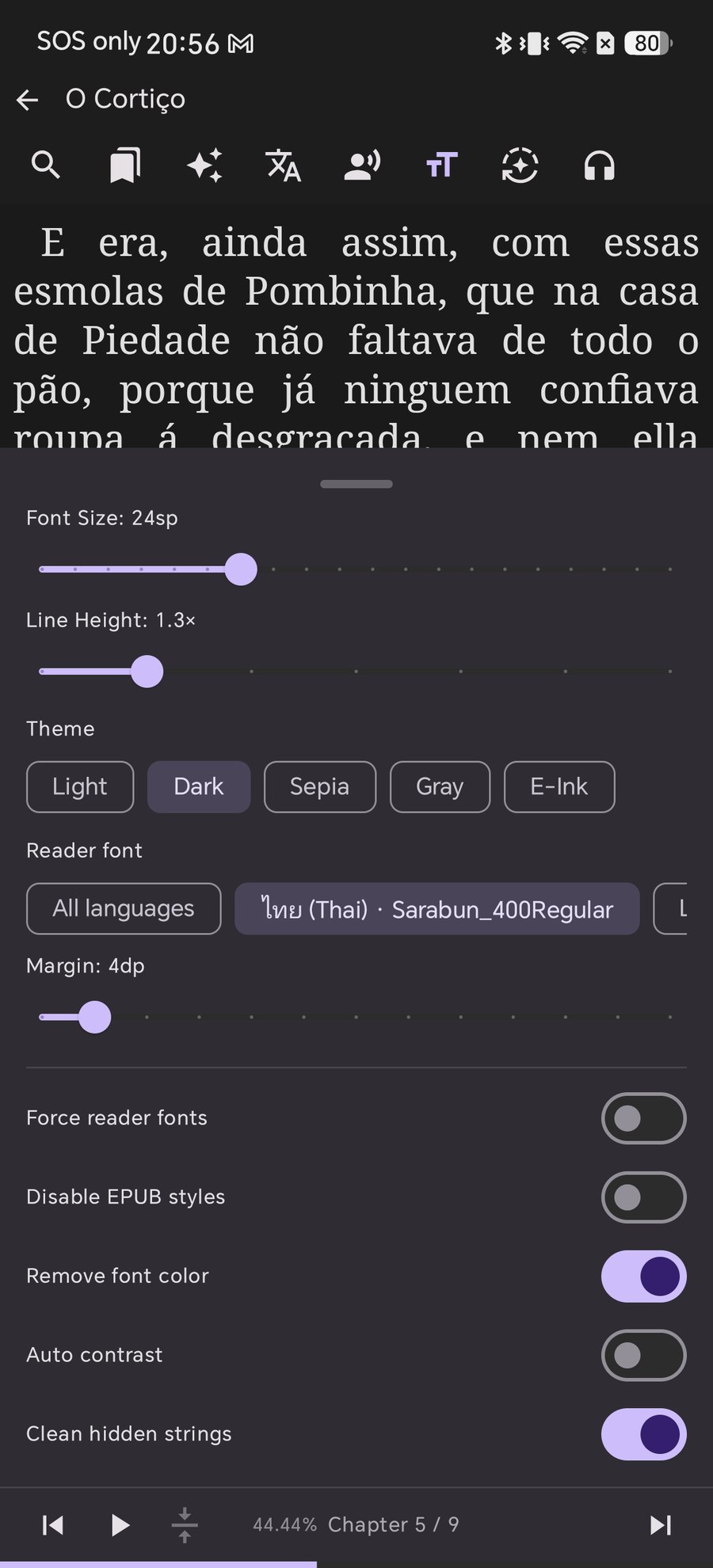
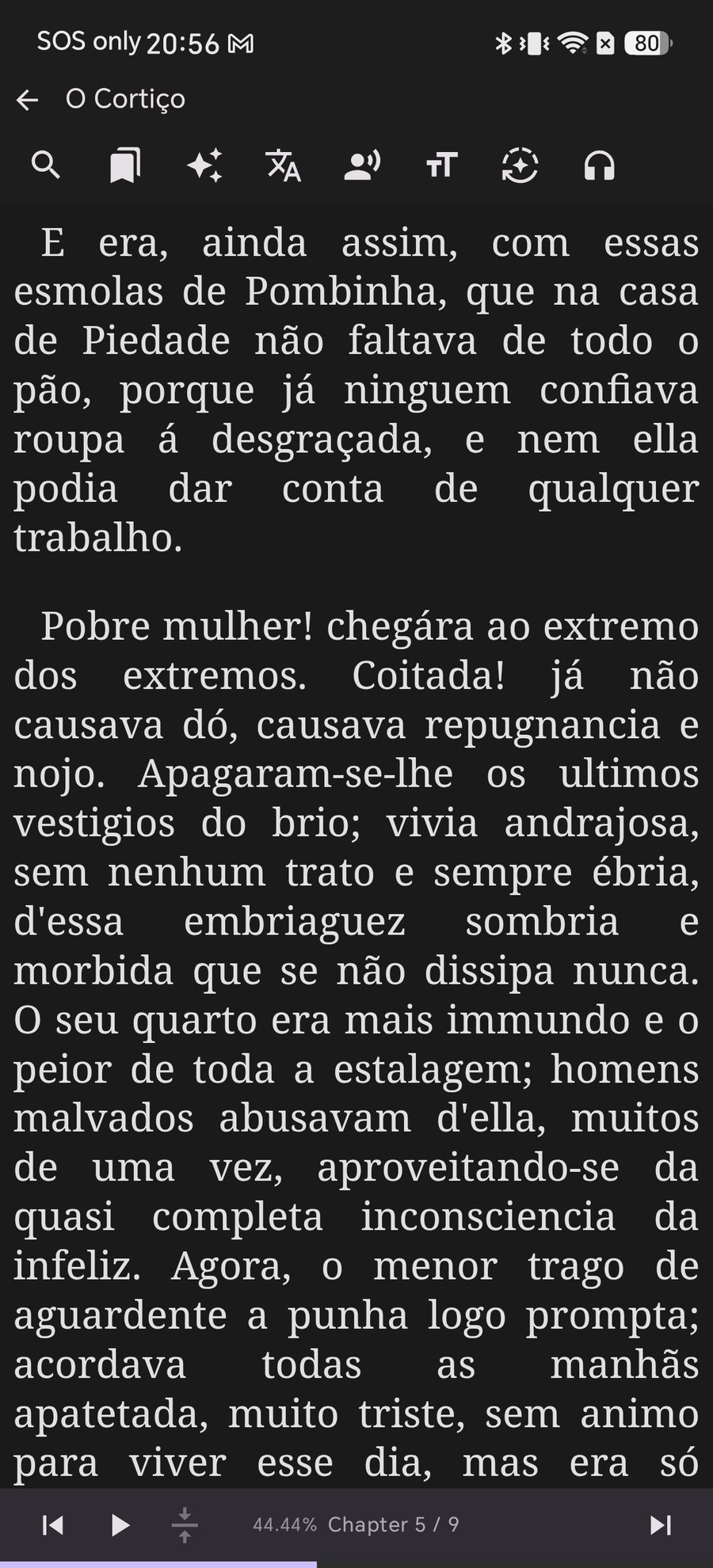
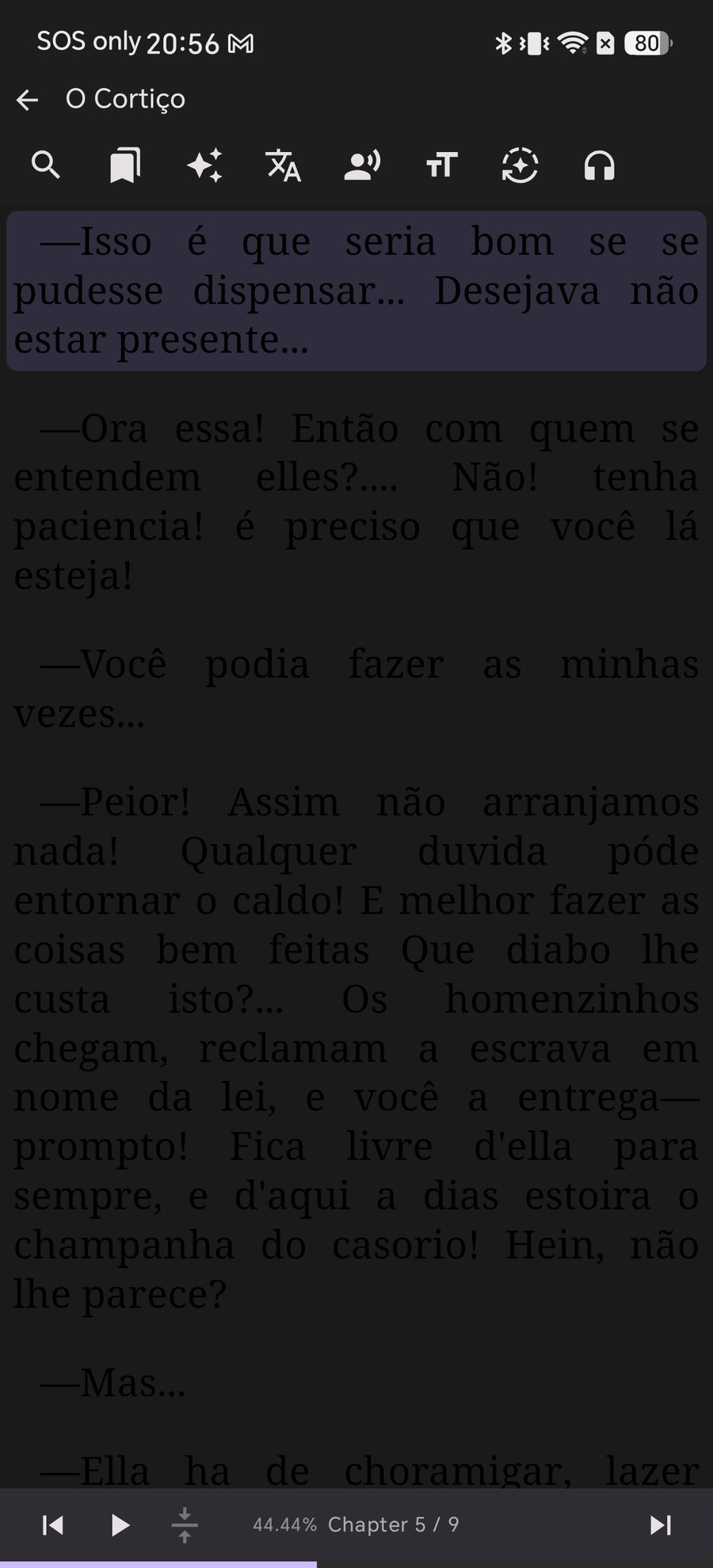
Here is O Cortiço (Project Gutenberg) open in Shiori on the Dark theme with every override switched off.

The text is there, but painted dark on dark and stretched into ragged word spacing. This is what happens when the book's stylesheet wins over your reader.

1ดูปัญหาที่เกิดขึ้นจริงบนหน้าจอ

นี่คือตัวอย่างหนังสือ O Cortiço จาก Project Gutenberg เมื่อเปิดบนธีมมืด (Dark Theme) โดยที่ยังไม่ได้เปิดสวิตช์ปรับแต่งใดๆ

ตัวหนังสือยังอยู่ครบ แต่ถูกบังคับให้เป็นสีดำบนพื้นหลังสีมืด พร้อมการเว้นวรรคคำที่กระจัดกระจาย ทำให้อ่านแทบไม่ออก

1問題の状態を確認する

Project Gutenbergの O Cortiço を、オーバーライドをオフにした状態でダークテーマで開いた例です。

黒背景の上に黒い文字が重なり、不自然な空白が広がっています。これが「書籍側のCSSが優先されている」状態です。

1查看排版冲突的原貌

这是在深色主题下打开 Project Gutenberg 电子书的实际画面(未开启任何样式覆盖)。

黑色文字隐入黑色背景,且字间距拉扯严重。这就是图书自带样式强行生效的典型表现。

1Veja o Problema Claramente

Aqui está o livro O Cortiço aberto no Shiori com o tema escuro e todas as sobreposições desativadas.

O texto está lá, mas em preto sobre fundo escuro com espaçamento irregular entre as palavras.

1Observa el Problema en Pantalla

Este es el libro O Cortiço abierto en Shiori en tema oscuro sin ninguna anulación activada.

El texto sigue ahí, pero en color oscuro sobre fondo negro con espacios desproporcionados entre palabras.

An EPUB rendered on Shiori's dark theme with the file's own styling, showing unreadable dark text on a black page
2Open Reading Settings Panel

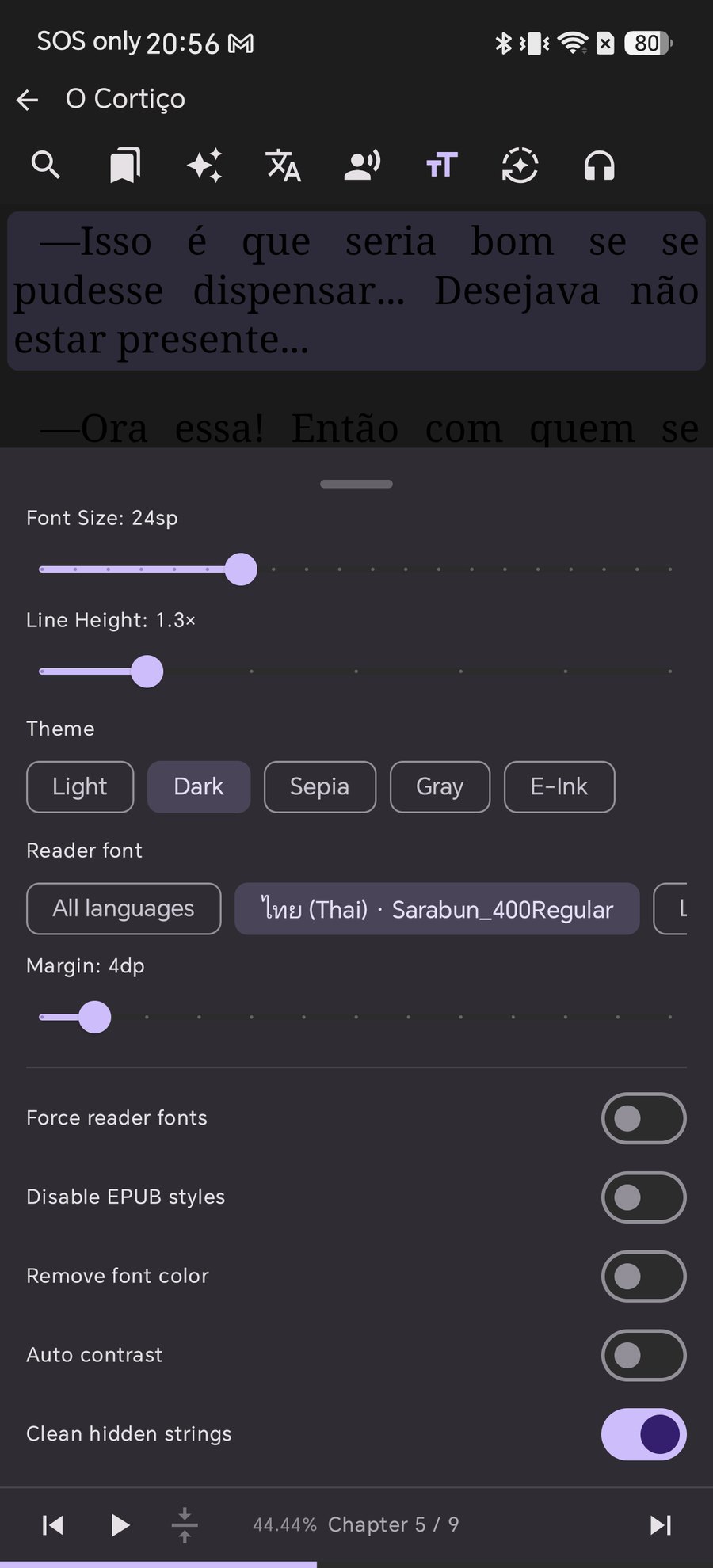
While reading, tap the тT icon in the top bar. The settings panel slides up from the bottom while keeping the book visible above it.

The top half controls standard typography (Font Size, Line Height, Theme, Margin). The switches underneath let you overrule the file when its styles conflict with your preferences.

2เปิดแถบเมนูตั้งค่าการอ่าน (Reading Settings)

ขณะเปิดอ่านหนังสือ ให้แตะที่ไอคอน тT บนแถบเมนูด้านบน แผงการตั้งค่าจะเลื่อนขึ้นมาจากด้านล่างโดยยังคงเห็นหน้าหนังสืออยู่ด้านบน

ด้านบนเป็นการตั้งค่าตัวอักษรทั่วไป (ขนาด, ระยะบรรทัด, ธีม, ฟอนต์, ขอบจอ) ส่วนสวิตช์ด้านล่างคือตัวจัดการสไตล์หนังสือที่มีปัญหา

2読書設定パネルを開く

読書画面の上部バーにある тT アイコンをタップします。画面下部から設定パネルが表示されます。

上部にはフォントサイズ、行の高さ、テーマ、余白などの基本設定があり、下部にあるスイッチ群で書籍側のCSSをオーバーライドできます。

2打开阅读设置面板

在阅读界面轻触顶部栏的 тT 图标,设置面板将从底部滑出,同时上方依然保留页面预览。

上半部分用于调整字号、行距、主题与边距,下方的开关组则用于精准解决排版冲突。

2Abra o Painel de Configurações de Leitura

Com o livro aberto, toque no ícone тT na barra superior. O painel desliza de baixo para cima mantendo a página visível.

A parte superior controla a tipografia básica e os seletores abaixo permitem anular os estilos problemáticos do livro.

2Abre el Panel de Ajustes de Lectura

Con el libro abierto, pulsa el icono тT en la barra superior. El panel se desplegará desde la parte inferior.

La mitad superior controla los ajustes tipográficos habituales y los interruptores inferiores te permiten anular los estilos del archivo.

Shiori reading settings panel showing typography controls and style override switches
3Turn on "Remove font color" First

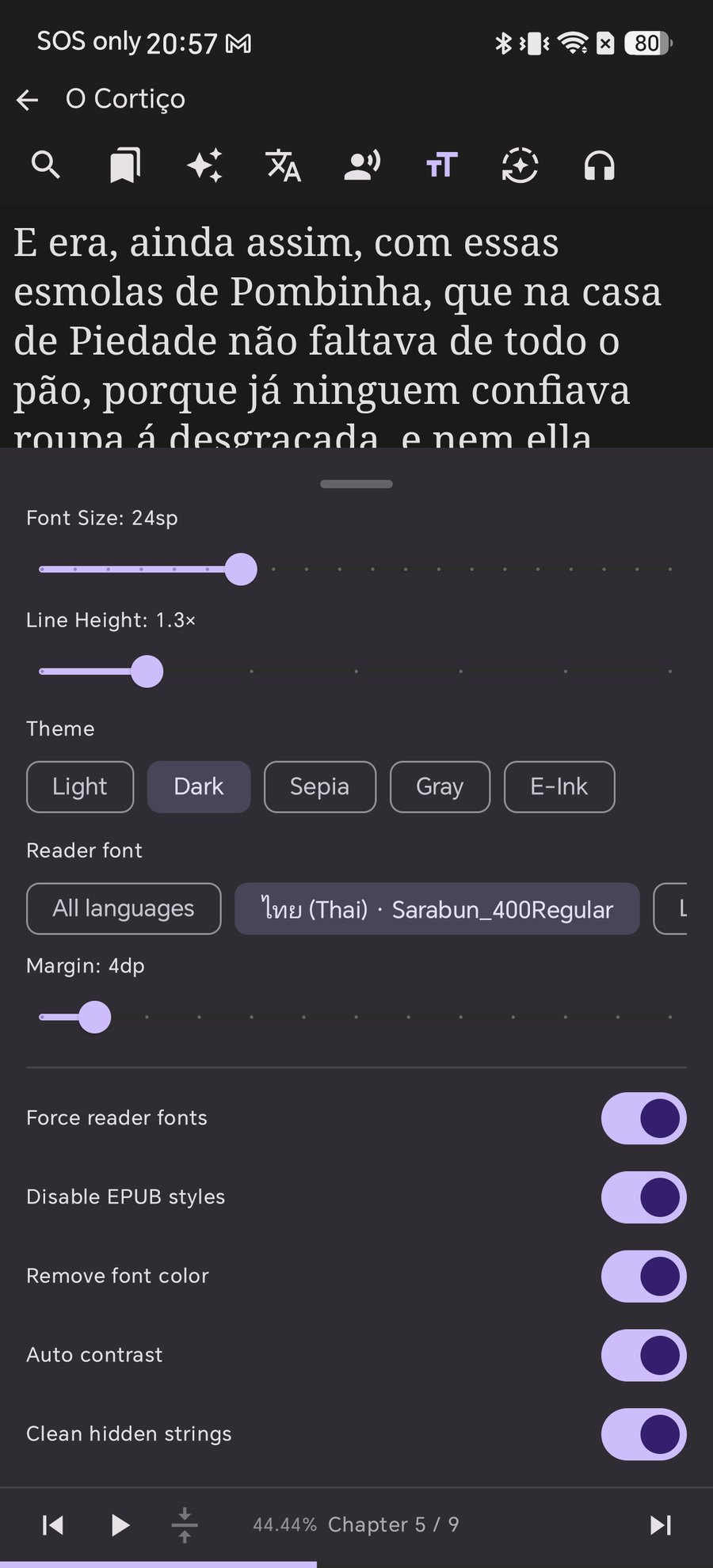
Invisible text is the most urgent issue. Turn on Remove font color and close the panel.

The text immediately renders in your theme's native color (bright text on a dark background). If you want to preserve colored headings, try Auto contrast instead.

3เปิดสวิตช์ "Remove font color" (ลบสีฟอนต์)

ตัวหนังสือที่มองไม่เห็นคือปัญหาแรกที่ต้องแก้ ให้เปิดสวิตช์ Remove font color แล้วปิดแผงตั้งค่า

ตัวหนังสือจะเปลี่ยนมาใช้สีตามธีมทันที (ตัวหนังสือสีสว่างบนพื้นหลังมืด) หากเป็นหนังสือที่มีหัวข้อหลากสีและต้องการคงสีไว้ ให้ลองเปิด Auto contrast แทน

3まず「Remove font color」をオンにする

読めない文字を直すのが最優先です。Remove font color(文字色をクリア)をオンにします。

文字色がテーマの文字色(暗い背景に明るい文字)に切り替わります。色付きの見出しを活かしたい場合は Auto contrast を試してください。

3首先开启 "Remove font color"(移除字体颜色)

文字隐形是最先需要解决的问题。开启 Remove font color 后关闭面板。

正文文字会立即跟随当前主题(在深色背景下呈现清晰亮色)。如果需要保留彩色标题,可以尝试使用 Auto contrast

3Ative Primeiro "Remove font color"

O texto invisível é o problema principal. Ative Remove font color e feche o painel.

O texto assume a cor do tema atual instantaneamente. Para preservar títulos coloridos, você pode experimentar o Auto contrast.

3Activa Primero «Remove font color»

El texto invisible es el primer problema a resolver. Activa Remove font color y cierra el panel.

El texto pasará a mostrarse con el color del tema actual. Si deseas mantener encabezados coloreados, prueba con Auto contrast.

Reading settings panel with Remove font color switch enabled Readable text rendered in theme color after enabling Remove font color
4Enable "Disable EPUB styles" & "Force reader fonts"

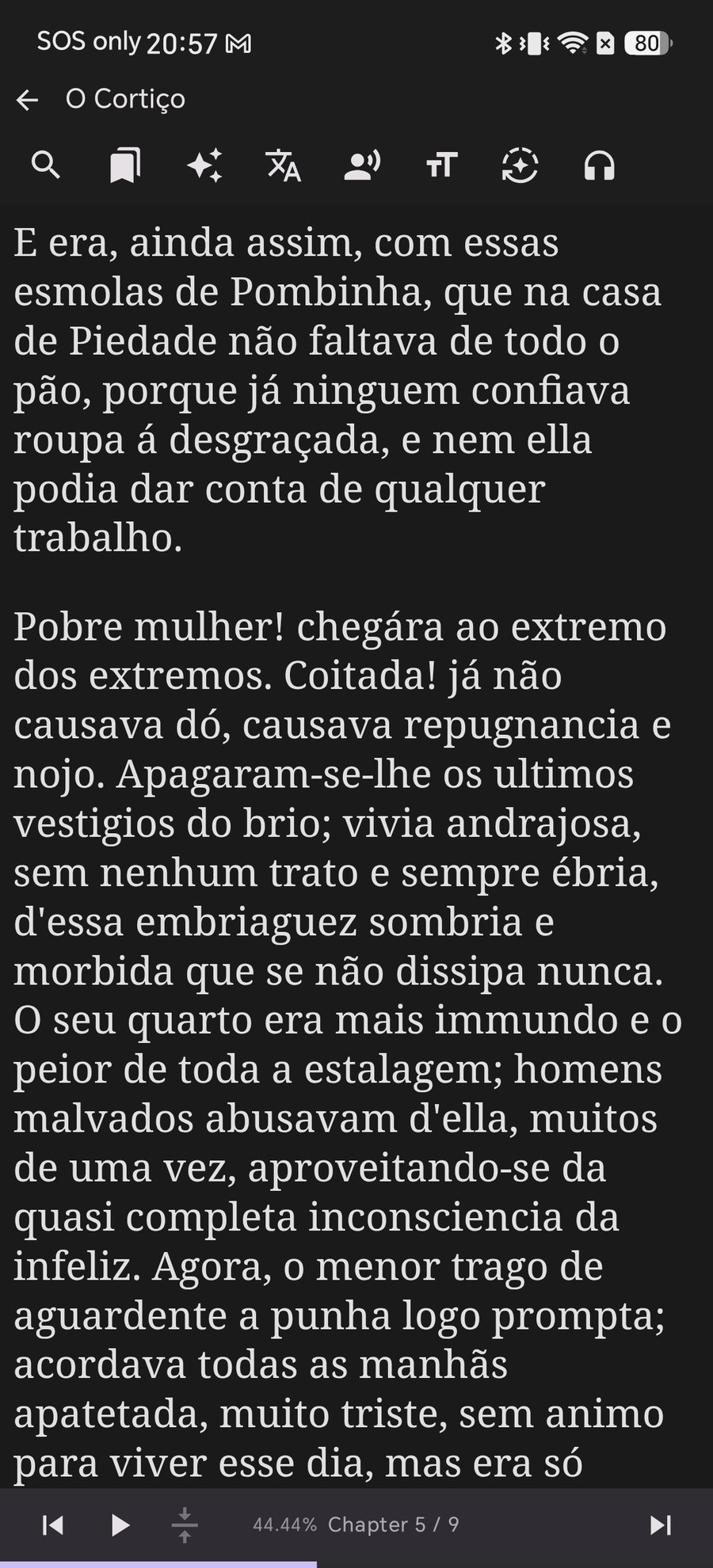
Colour was only the first step. Bad layout and unnatural word spacing make reading tiring.

Turn on Disable EPUB styles and Force reader fonts. The ragged spacing disappears, forced indents reset, and your custom font size, line height and margins apply cleanly across every paragraph.

4เปิด "Disable EPUB styles" และ "Force reader fonts"

การแก้สีเป็นเพียงขั้นตอนแรก แต่การจัดหน้าที่ไม่ลงตัวและช่องว่างระหว่างคำที่กว้างเกินไปจะทำให้สายตาเมื่อยล้าได้ง่าย

เปิดสวิตช์ Disable EPUB styles และ Force reader fonts ช่องว่างระหว่างคำที่ผิดปกติจะหายไป และค่าขนาดตัวอักษร ระยะห่างบรรทัด รวมถึงขอบจอที่คุณตั้งไว้จะทำงานอย่างสมบูรณ์แบบ

4「Disable EPUB styles」と「Force reader fonts」をオンにする

文字色の修正に加え、乱れたレイアウトや不自然な余白も整えましょう。

Disable EPUB stylesForce reader fonts をオンにすると、無駄な空白や不要なインデントが消え、自分で設定した文字サイズや行間が均一に適用されます。

4开启 "Disable EPUB styles" 与 "Force reader fonts"

修正文字颜色只是第一步,糟糕的排版与过宽的字间距同样影响阅读体验。

开启 Disable EPUB styles(禁用书籍样式)与 Force reader fonts(强制阅读器字体),怪异的字距将被抹平,您自定义的字号、行距和边距即可统一生效。

4Ative "Disable EPUB styles" e "Force reader fonts"

O alinhamento ruim e os espaçamentos exagerados cansam a vista durante leituras longas.

Ao ativar Disable EPUB styles e Force reader fonts, os recuos forçados são removidos e seus ajustes de tamanho, entrelinha e margens são aplicados perfeitamente.

4Activa «Disable EPUB styles» y «Force reader fonts»

Un diseño descuidado y espacios excesivos entre palabras cansan la vista con rapidez.

Al activar Disable EPUB styles y Force reader fonts, se eliminan sangrías forzadas y se aplican tus preferencias de tamaño, espaciado y márgenes.

Reading settings panel with all style overrides enabled Clean and comfortable book layout after enabling all style overrides
5Pick the Ideal Font per Language

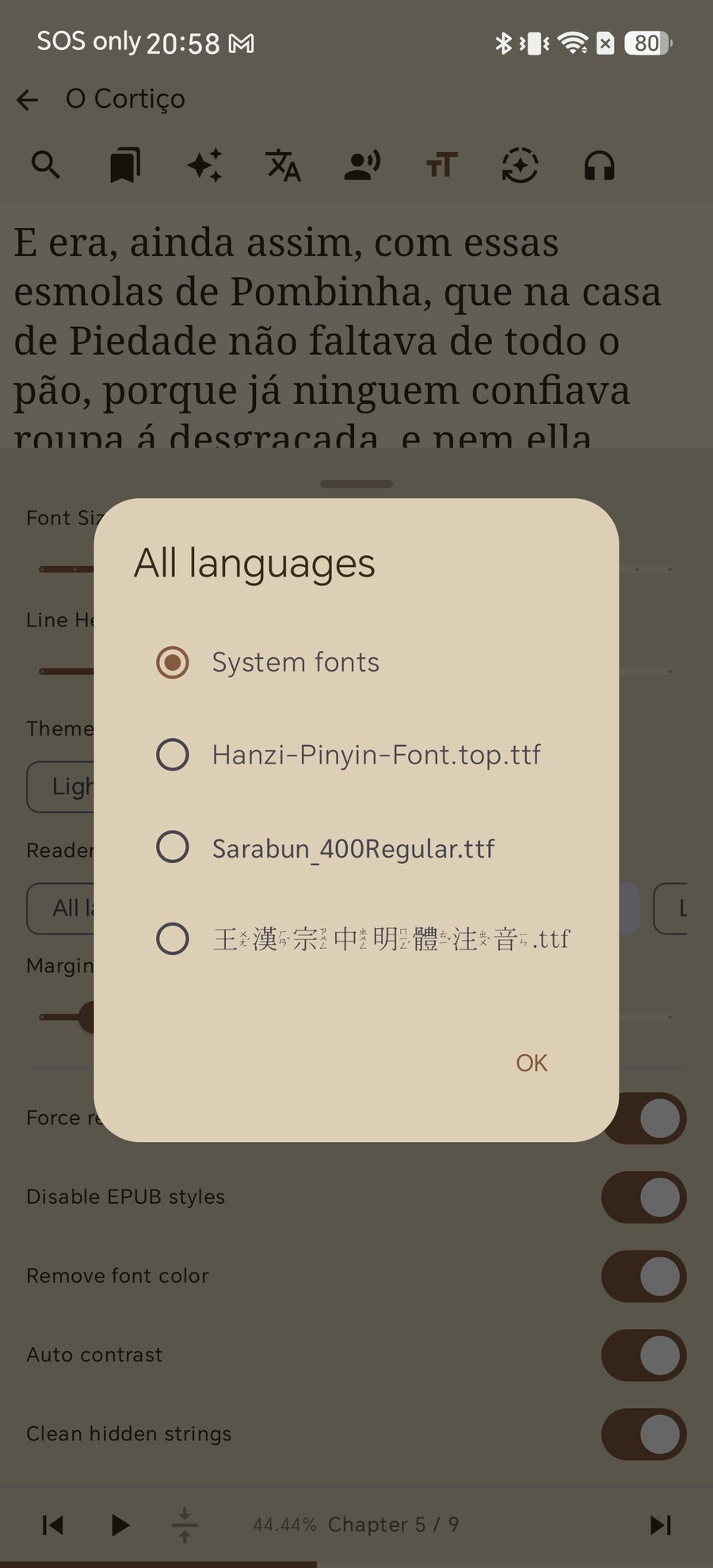
Tap Reader font → All languages (or select a specific language) to choose the font Shiori will use.

You can choose System fonts or any custom .ttf / .otf font file you have imported. Shiori lets you assign different fonts for Thai, Japanese, Chinese, or Latin scripts independently.

5เลือกฟอนต์ที่ต้องการใช้งานแยกตามภาษา

แตะที่เมนู Reader font → All languages (หรือเลือกภาษาที่ต้องการ) เพื่อกำหนดฟอนต์สำหรับอ่านหนังสือ

คุณสามารถใช้ System fonts หรือเลือกฟอนต์ .ttf / .otf ที่นำเข้าเข้ามาเองได้ โดย Shiori รองรับการแยกฟอนต์อิสระระหว่างภาษาไทย ภาษาญี่ปุ่น ภาษาจีน และภาษาอังกฤษ

5言語ごとに最適なフォントを選択

Reader font → All languages(または各個別言語)をタップして、表示に使用するフォントを選択します。

System fonts(システム標準)のほか、自分でインポートしたカスタムフォントも指定可能です。日本語・英語・タイ語など言語ごとにフォントを個別に割り当てられます。

5按语言自由挑选心仪字体

点击 Reader font → All languages(或指定特定语言)选择渲染所用的字体。

可选用 System fonts(系统字体)或导入的 .ttf / .otf 自定义字体文件。Shiori 支持为中文、日文、泰文和西文分别指定专属字体。

5Escolha a Fonte Ideal por Idioma

Toque em Reader font → All languages para definir a fonte que o Shiori utilizará.

Você pode usar as System fonts ou fontes .ttf / .otf importadas por você, com controle independente para cada idioma.

5Elige la Tipografía Adecuada por Idioma

Pulsa en Reader font → All languages para elegir la tipografía que utilizará Shiori.

Puedes seleccionar System fonts o fuentes personalizadas .ttf / .otf que hayas importado, con ajuste independiente para cada idioma.

Shiori reader font picker dialog listing system and imported custom fonts
6Now Your Reading Theme Truly Applies

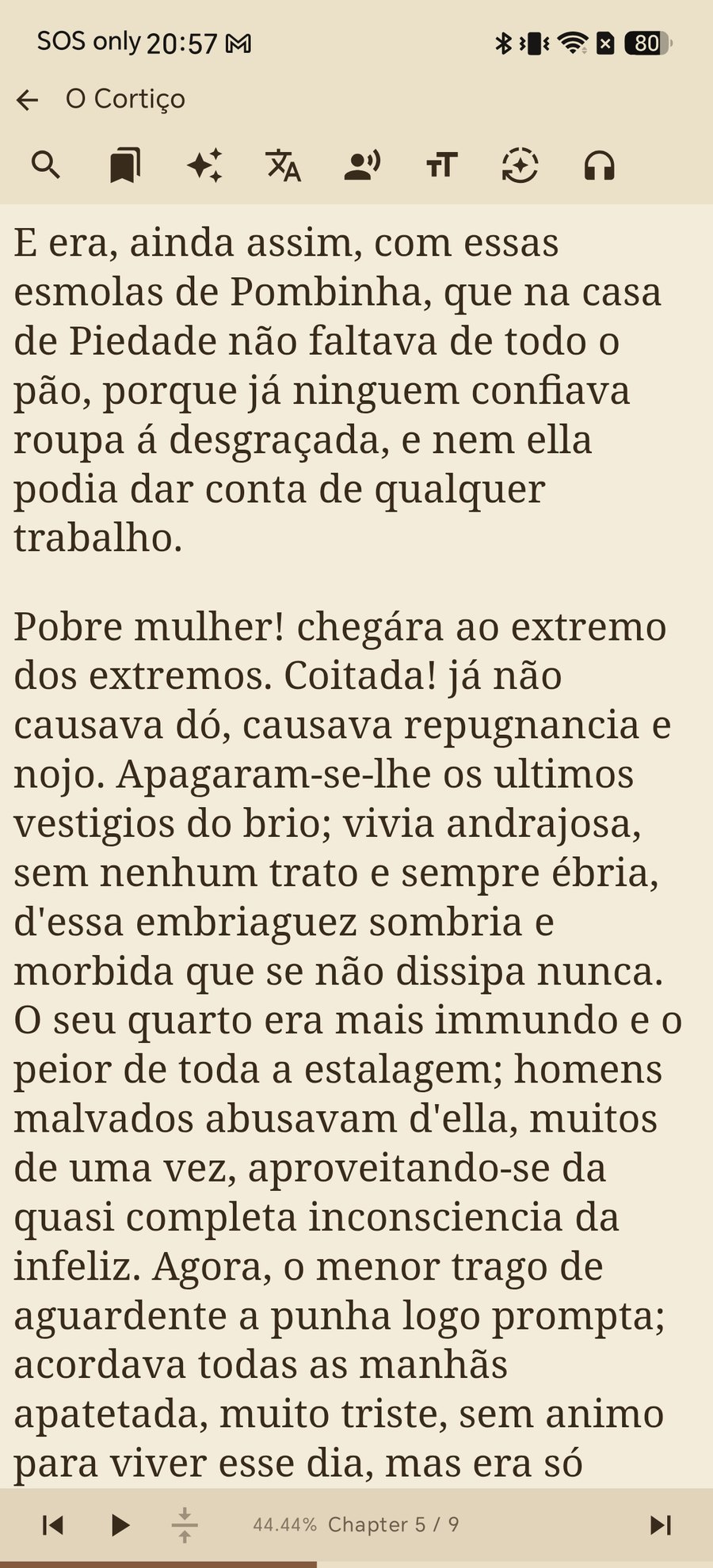
Once hardcoded styles are cleared, your themes behave exactly as intended. Tap between Light, Dark, Sepia, Gray, and E-Ink.

The page background and text contrast change harmoniously in unison because typography decisions are now placed firmly back in your hands.

6เปลี่ยนธีมสีได้อย่างอิสระ สบายตาทุกสภาพแสง

เมื่อปลดล็อกสไตล์เดิมออกแล้ว ไม่ว่าคุณจะสลับระหว่างธีม Light (สว่าง), Dark (มืด), Sepia (ถนอมสายตา), Gray (เทา) หรือ E-Ink

สีพื้นหลังและสีตัวอักษรจะปรับเปลี่ยนคู่กันอย่างลงตัว มอบประสบการณ์การอ่านที่สบายตาและควบคุมได้ 100%

6カラーテーマが美しく適用される

固定スタイルが解除されたことで、Light、Dark、Sepia、Gray、E-Inkなどのテーマが本来の美しいコントラストで適用されます。

背景色と文字色が完璧に調和し、長時間の読書でも目が疲れにくい快適な環境が完成します。

6主题色彩完美生效,随心切换

清除了硬编码样式后,无论切换至 Light(明亮)、Dark(深色)、Sepia(羊皮纸)、Gray(水墨灰)还是 E-Ink 主题,

背景与文字色彩均能完美自适应,将排版与色彩的控制权完全交还到您的手中。

6Agora Seus Temas Funcionam Perfeitamente

Sem estilos conflitantes, você pode alternar livremente entre os temas Claro, Escuro, Sépia, Cinza e E-Ink.

O fundo e o texto se adaptam em harmonia, garantindo o máximo de conforto para os seus olhos.

6Tus Temas de Lectura se Aplican a la Perfección

Una vez eliminados los estilos fijos, puedes alternar entre Claro, Oscuro, Sepia, Gris y E-Ink sin fallos.

El fondo y la tipografía cambian de forma armónica para ofrecerte el máximo confort visual.

Book rendered in warm Sepia theme after clearing hardcoded styles

Troubleshooting & Frequently Asked Questions

การแก้ไขปัญหาและคำถามที่พบบ่อย (FAQ)

トラブルシューティング&よくある質問(FAQ)

故障排查与常见问题解答(FAQ)

Solução de Problemas e Perguntas Frequentes (FAQ)

Solución de Problemas y Preguntas Frecuentes (FAQ)

What if the font size still doesn't change when adjusted?
The book's stylesheet is using fixed CSS rules with high specificity. Make sure Disable EPUB styles is turned ON so Shiori can take full control of font scaling and paragraph layout.
หากปรับขนาดฟอนต์แล้วตัวหนังสือยังคงไม่เปลี่ยนขนาด ต้องทำอย่างไร?
เกิดจากไฟล์หนังสือล็อคขนาดฟอนต์แบบคงที่ใน CSS ให้เปิดสวิตช์ Disable EPUB styles (ปิดสไตล์ EPUB) ระบบจะเพิกเฉยต่อ CSS เดิมและบังคับใช้ขนาดที่คุณตั้งไว้ทันที
フォントサイズを変更してもサイズが変わらない場合は?
書籍側のCSSで固定サイズが指定されているためです。Disable EPUB styles をオンにすることで、アプリ側のフォントサイズ設定が強制適用されます。
为什么调整字号后文字大小依然没有变化?
这是因为图书内嵌的 CSS 样式强制锁死了文字大小。开启 Disable EPUB styles(禁用图书样式) 即可忽略书籍自带限制,使字号缩放正常生效。
E se o tamanho da fonte ainda não mudar ao ser ajustado?
O CSS do livro está forçando um tamanho fixo. Ative a opção Disable EPUB styles para que o Shiori assuma o controle do tamanho do texto.
¿Qué hacer si el tamaño de letra sigue sin cambiar al ajustarlo?
La hoja de estilos del libro utiliza reglas fijas. Asegúrate de activar Disable EPUB styles para que Shiori tome el control total del tamaño tipográfico.
Will enabling these overrides apply to my other books automatically?
Yes. Style overrides are saved as your personal reader preferences, so whenever you open a poorly formatted book in the future, Shiori renders it cleanly right away.
การตั้งค่าสวิตช์เหล่านี้จะมีผลกับหนังสือเล่มอื่นๆ ด้วยหรือไม่?
มีผลอัตโนมัติครับ การตั้งค่าจะถูกบันทึกเป็นค่าเริ่มต้นของแอป Shiori ดังนั้นเมื่อคุณเปิดอ่านหนังสือเล่มใหม่ในอนาคต ระบบจะเรนเดอร์หน้าหนังสือให้อ่านง่ายโดยอัตโนมัติ
この設定は他の本を開いたときにも適用されますか?
はい。オーバーライド設定はリーダー全体の個人設定として保存されるため、今後開く別の本でも自動的に快適な表示が維持されます。
这些覆盖设置会自动应用到其他图书吗?
是的。样式覆盖会保存为您的专属阅读偏好,后续打开任何排版有冲突的书籍时,Shiori 都会自动呈现舒适整洁的版面。
Essas opções serão aplicadas a outros livros automaticamente?
Sim. As sobreposições são salvas nas preferências do leitor, aplicando-se automaticamente aos próximos livros que você abrir.
¿Se aplicarán estos ajustes a otros libros automáticamente?
Sí. Las anulaciones de estilo se guardan como tus preferencias generales del lector, aplicándose a cualquier libro futuro.
Why does "Clean hidden strings" help with Text-to-Speech (TTS)?
Some EPUB conversions leave broken XML tags, zero-width characters or hidden soft hyphens in the text. Clean hidden strings strips them out so TTS speech flows naturally without random pauses.
ทำไมฟังก์ชัน "Clean hidden strings" ถึงช่วยให้เสียงอ่าน TTS ลื่นไหลขึ้น?
ไฟล์ EPUB ที่แปลงมาจากแหล่งต่างๆ มักมีแท็กขยะ ตัวอักษรความกว้างศูนย์ หรือโค้ดตัดคำแฝงอยู่ การเปิด Clean hidden strings จะช่วยล้างโค้ดเหล่านี้ออก ทำให้เสียงอ่าน TTS อ่านได้ต่อเนื่องไม่สะดุด
なぜ「Clean hidden strings」がTTS音声読み上げに効果的なのですか?
一部の書籍データには非表示のゴミタグやゼロ幅スペースが残っています。Clean hidden strings でこれらを自動除去することで、TTSがスムーズに読み上げられます。
为什么 "Clean hidden strings" 能改善 TTS 语音朗读效果?
部分转换制作的 EPUB 包含零宽字符或残留的隐藏软连字符。开启 Clean hidden strings 可过滤这些干扰,让 TTS 朗读更自然流畅。
Por que o "Clean hidden strings" melhora a leitura em voz alta (TTS)?
Muitos arquivos contêm caracteres invisíveis ou códigos residuais. O Clean hidden strings remove esse lixo para que o TTS leia sem pausas estranhas.
¿Por qué «Clean hidden strings» mejora la narración por voz (TTS)?
Muchos EPUBs conservan caracteres invisibles o etiquetas rotas. Clean hidden strings los elimina para que la voz fluya con total naturalidad.

Related Reading

บทความที่เกี่ยวข้อง

関連記事

相关阅读

Leitura Relacionada

Lecturas Relacionadas