Every ebook has something you would change. A translator's spelling you dislike, a name your text-to-speech voice mangles, footnote markers that interrupt the narration, or three exclamation marks where one would do. Shiori's Text Replacement fixes all of it — across every book, without editing a single file.
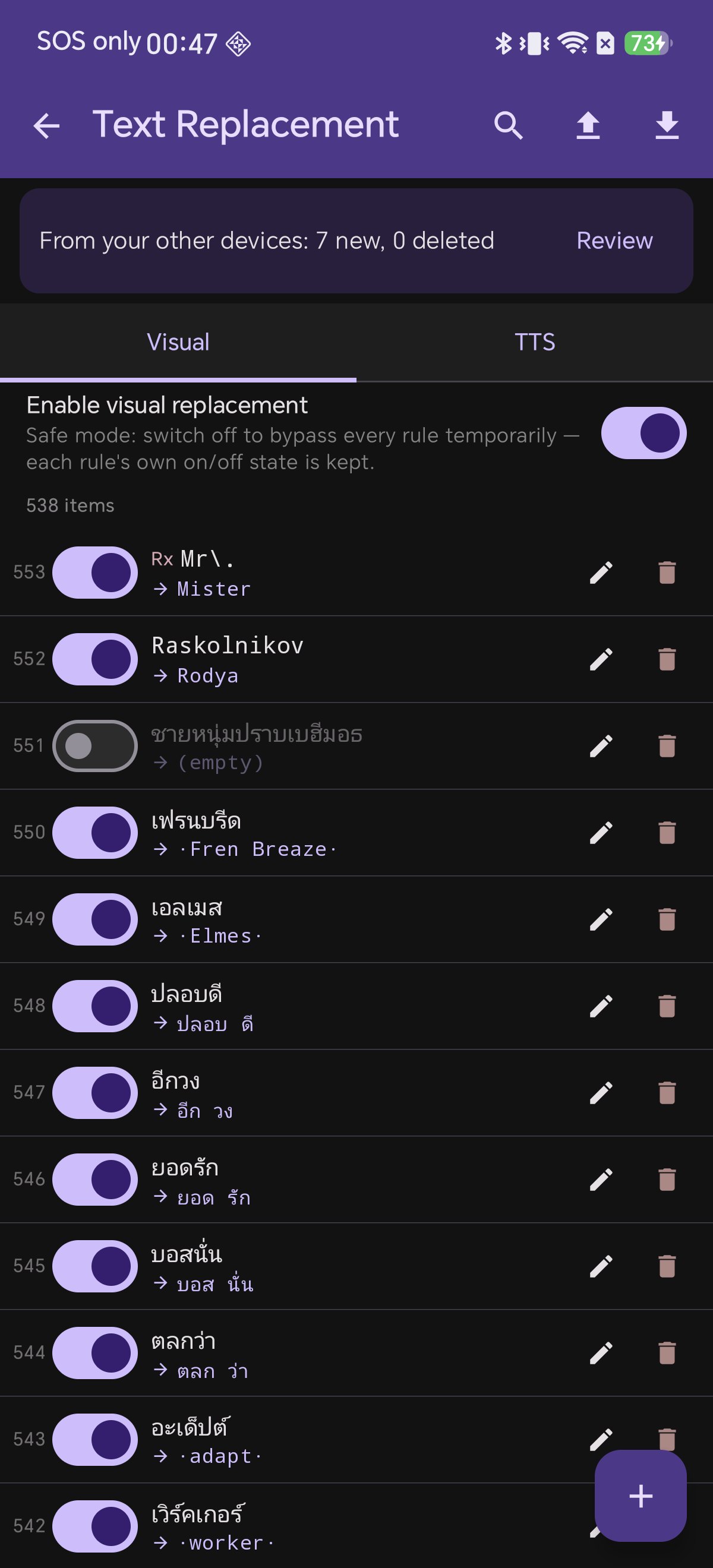
There are two lists, and the difference between them is the whole idea.
Visual vs TTS: The One Thing to Understand
| Visual | TTS |
|---|
| Changes the page you see | ✅ Yes | ❌ No |
| Changes what the voice reads | ✅ Yes | ✅ Yes |
| Typical use | spelling, clutter, renaming | pronunciation, abbreviations |
In the app's own words: a Visual rule "replaces text in reader view and before TTS reads," while a TTS rule "replaces text only when sent to TTS — not shown in reader."
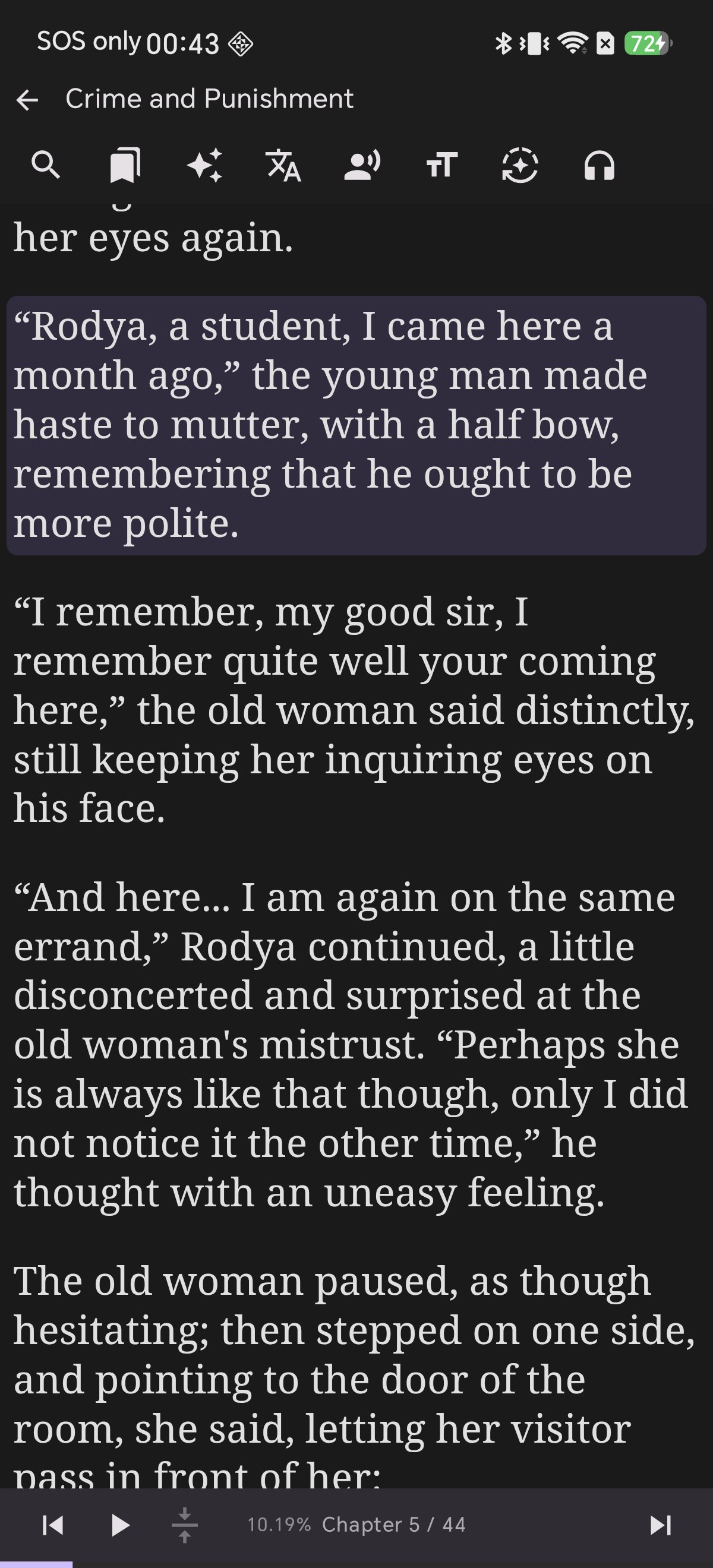
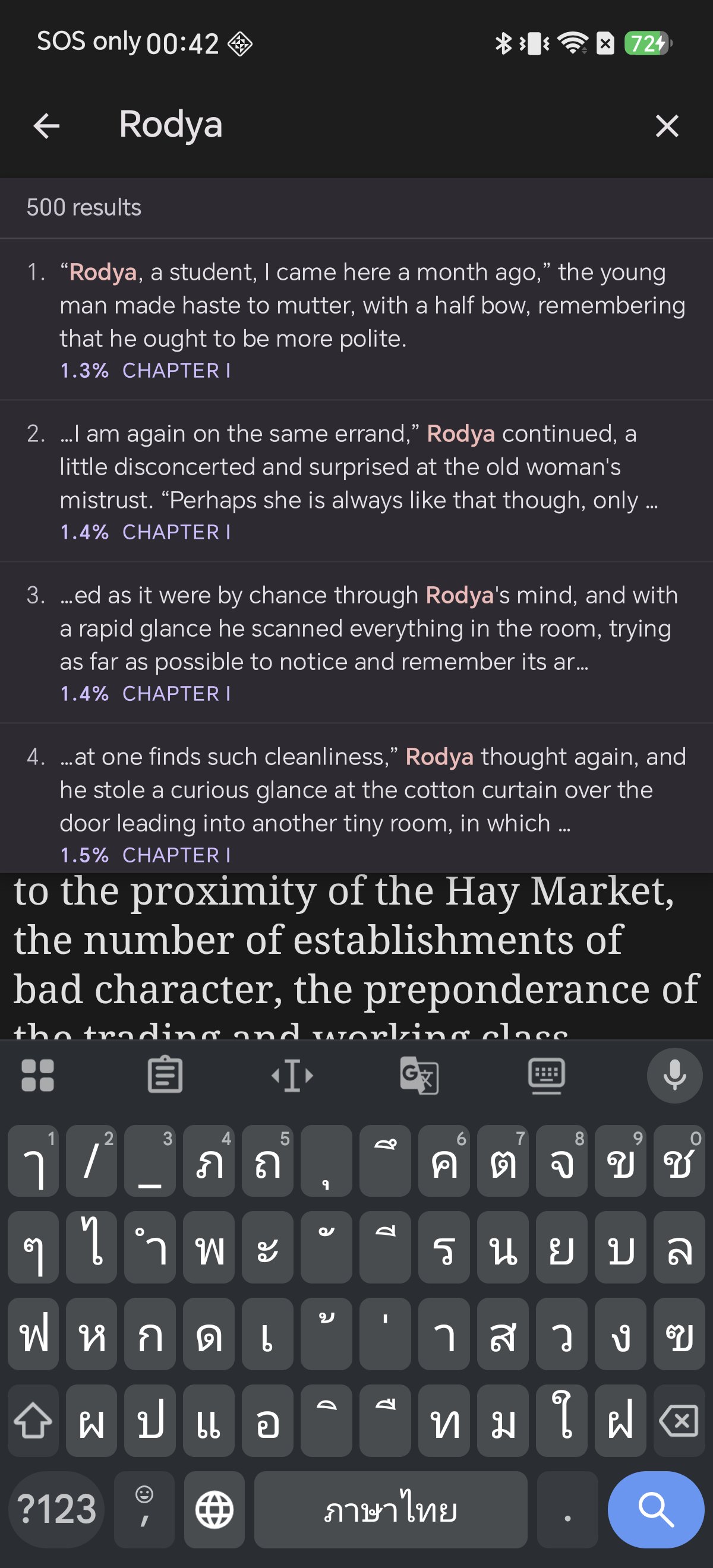
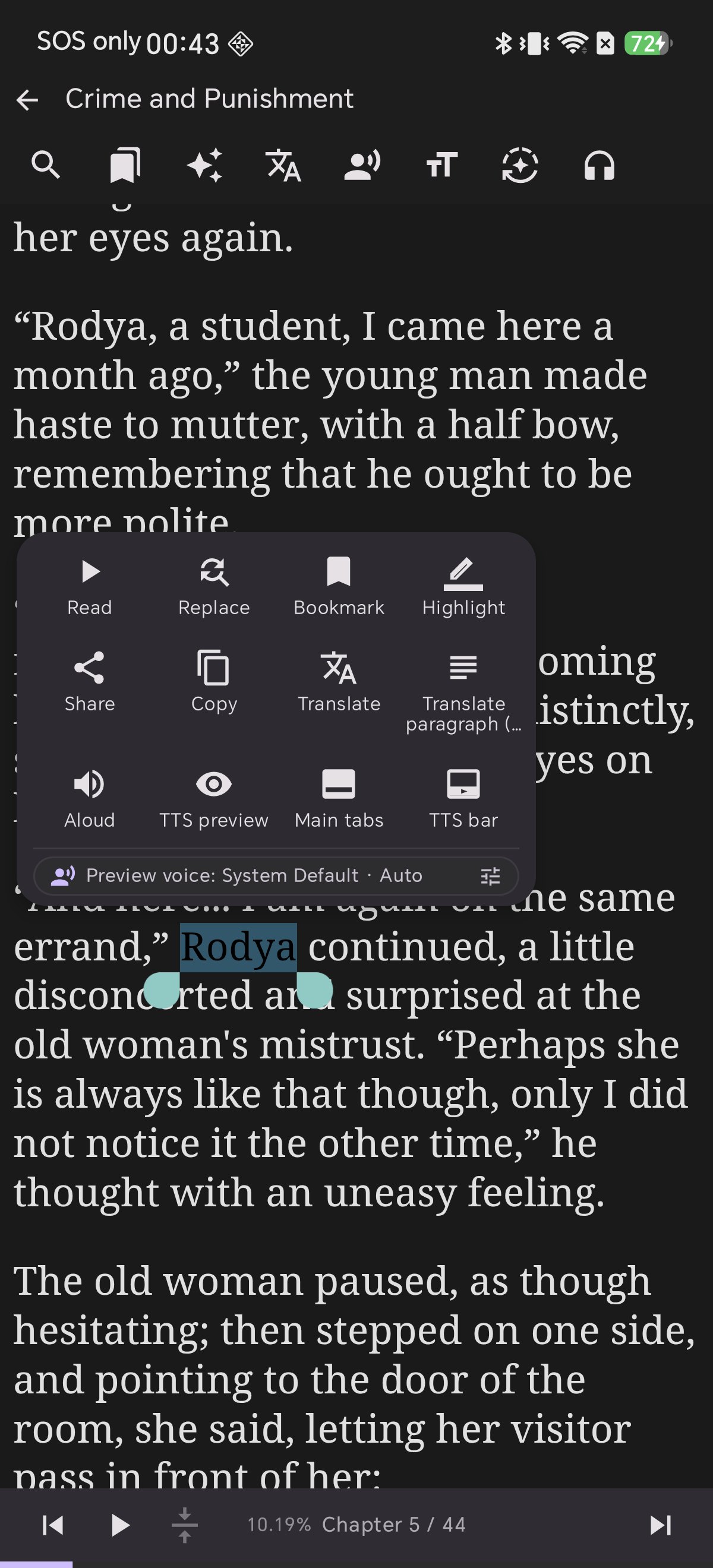
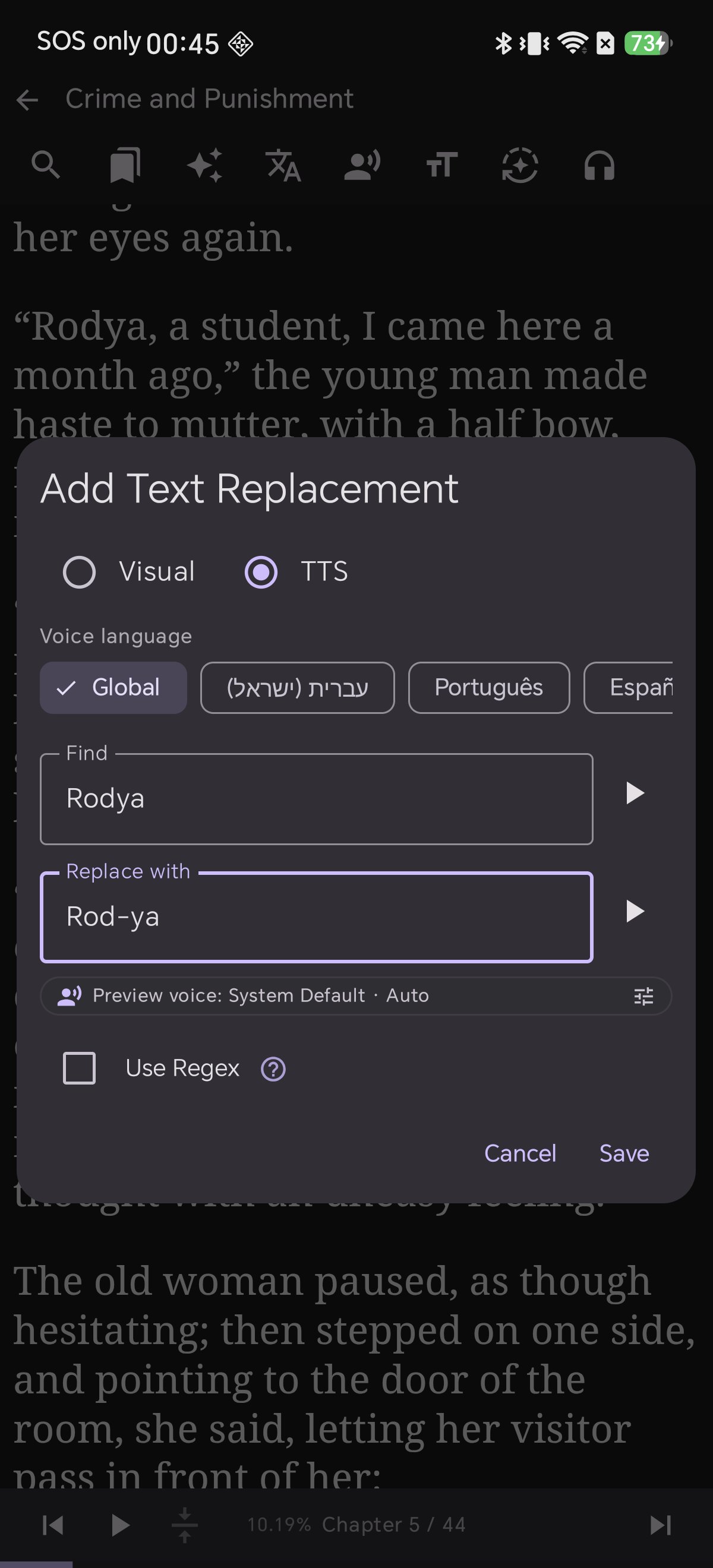
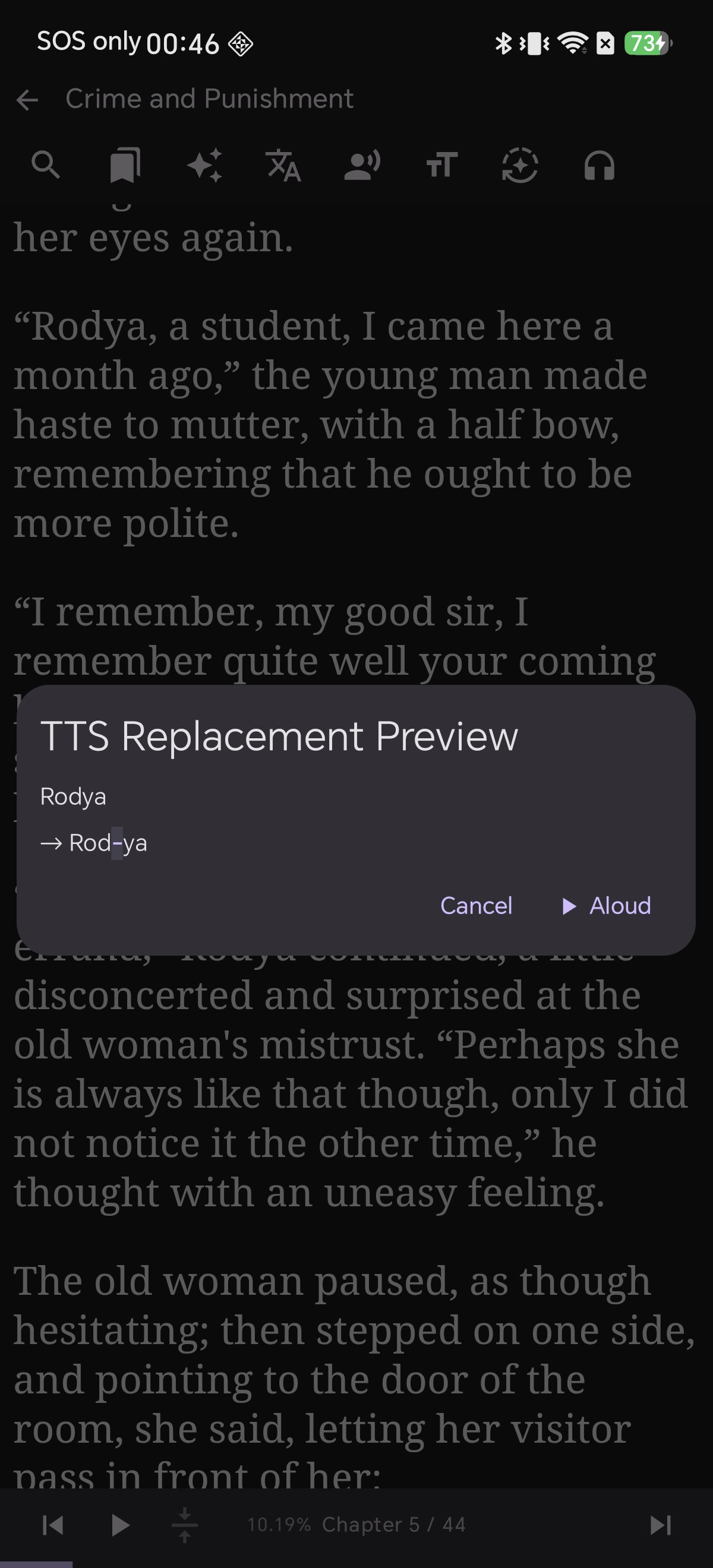
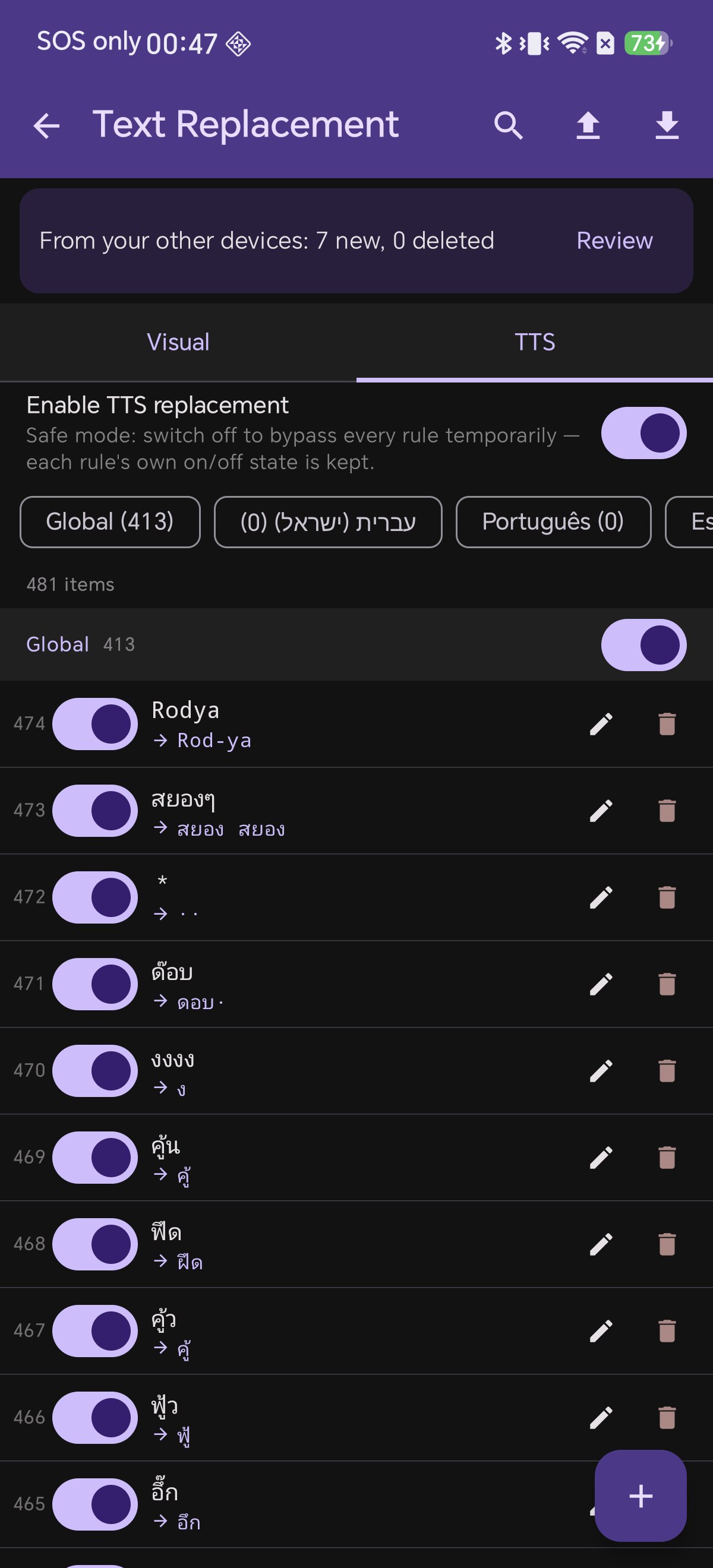
So: if you want to see the change, use Visual. If you only want to hear it, use TTS. A pronunciation hack like Rodya → Rod-ya belongs on the TTS list, where it will never disfigure the page.
Neither list ever touches your EPUB file. Rules are applied on the fly, every time a chapter renders or a paragraph is spoken — so deleting a rule restores the original wording instantly.
Anatomy of a Rule
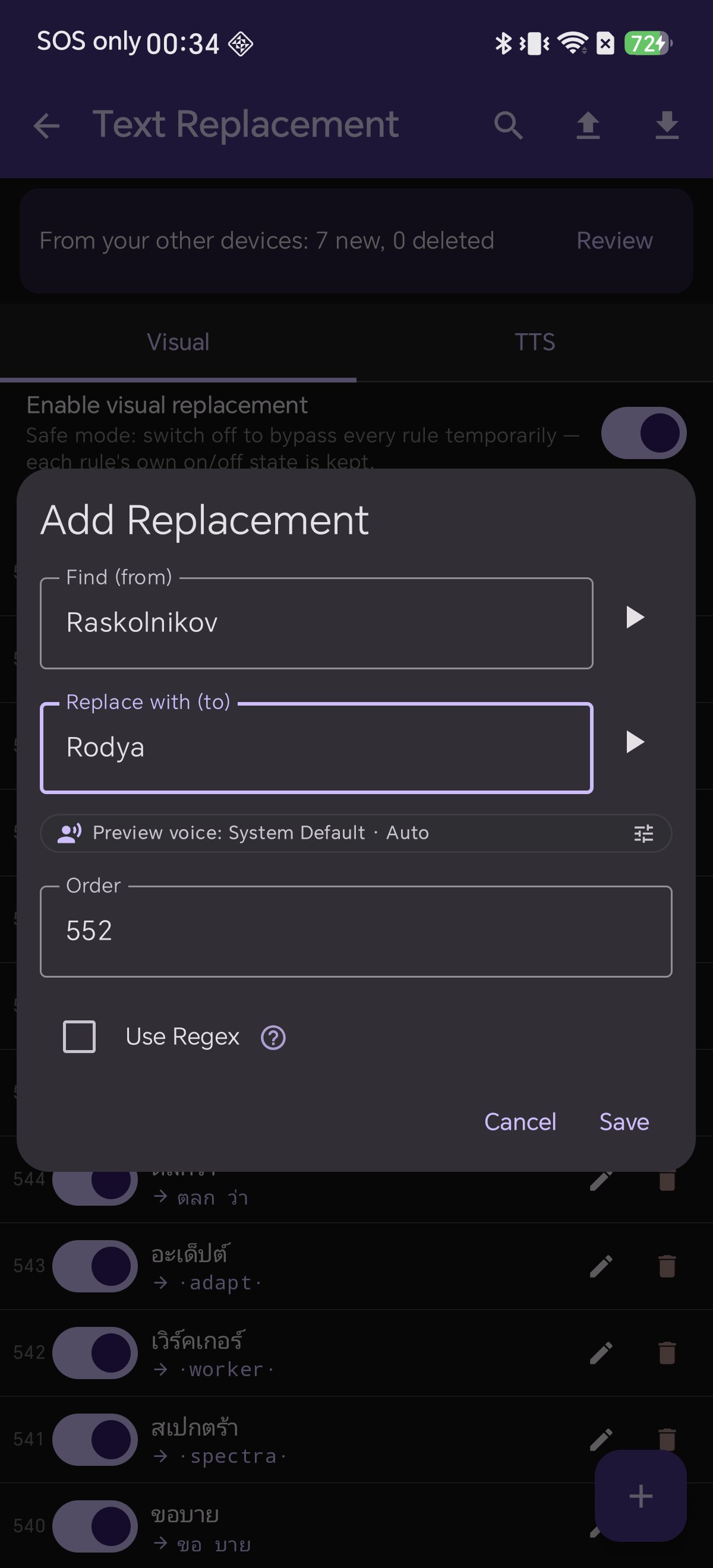
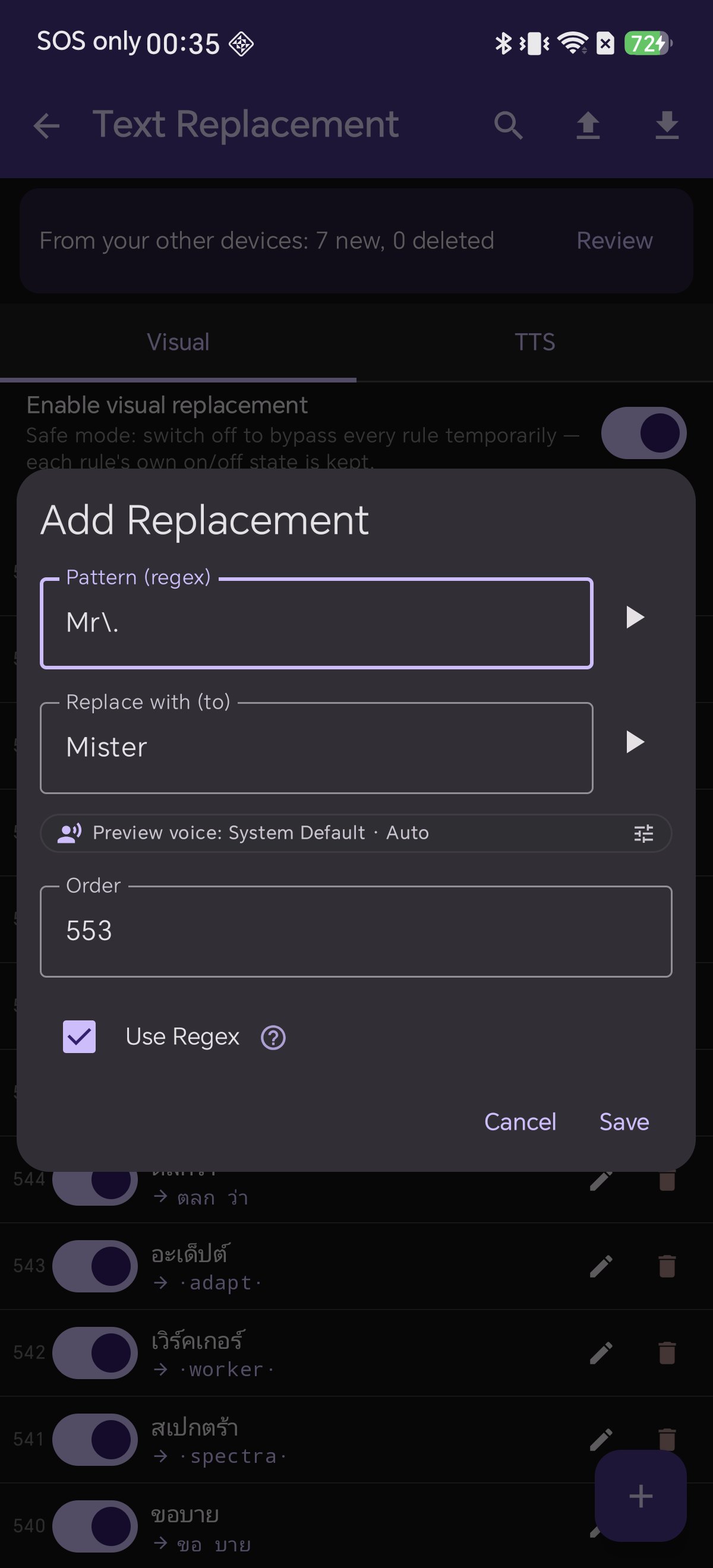
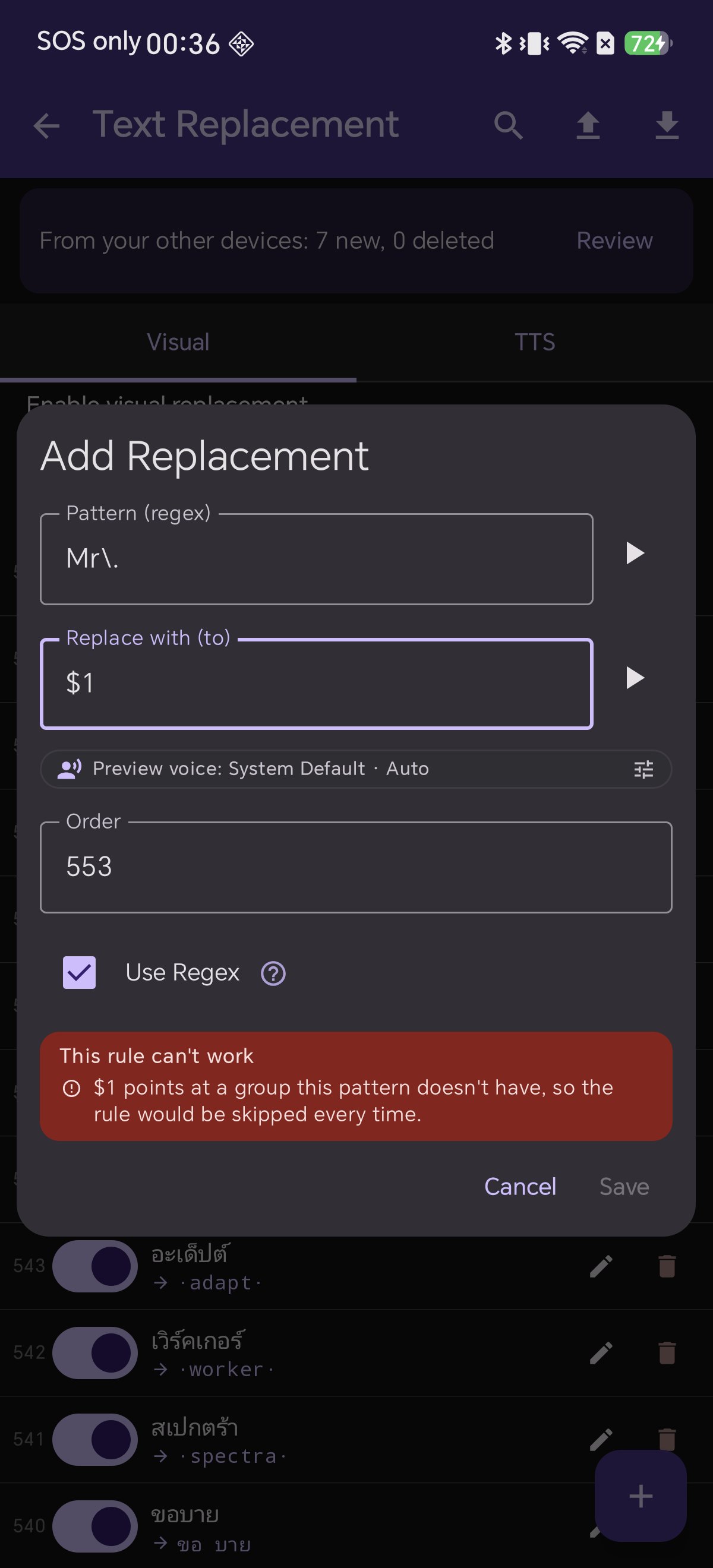
- Find (from) — the text to look for. With Use Regex on, this field is relabelled Pattern (regex).
- Replace with (to) — what to put in its place. Leave it empty to delete the match.
- Use Regex — plain text or pattern. The ? beside it opens a built-in cheat sheet.
- Order — rules run in this order, each one working on the result of the last.
- On/off switch — on every row, so you can park a rule without deleting it.
- ▶ buttons — hear either field spoken aloud, in the preview voice shown underneath.
Twelve Steps to Text Perfection
Follow along with every step from basic text replacement to language-specific voice rules.
ในระหว่างอ่านหนังสือ E-Book บ่อยครั้งเราอาจเจอคำที่อยากปรับเปลี่ยน เช่น คำสะกดเก่าที่ไม่คุ้นตา, ชื่อตัวละครภาษาต่างประเทศที่ระบบอ่านออกเสียง (TTS) ออกเสียงเพี้ยน, ตัวเลขเชิงอรรถอย่าง [12] ที่มาขัดจังหวะการฟัง หรือเครื่องหมายตกใจซ้ำๆ หลายตัว ระบบ Text Replacement (แทนที่ข้อความ) ใน Shiori ถูกออกแบบมาเพื่อแก้ไขสิ่งเหล่านี้ได้อย่างเบ็ดเสร็จในทุกเล่ม โดยไม่ต้องแก้ไขไฟล์ต้นฉบับเลยแม้แต่น้อย
หัวใจสำคัญของระบบนี้คือการแยกรายการออกเป็น 2 หมวดหมู่อย่างชาญฉลาด
Visual vs TTS: ความแตกต่างที่เข้าใจง่าย
| คุณสมบัติ | Visual (เปลี่ยนการแสดงผล) | TTS (เปลี่ยนเสียงอ่าน) |
|---|
| เปลี่ยนตัวหนังสือบนหน้าจอที่มองเห็น | ✅ เปลี่ยน | ❌ ไม่เปลี่ยน (หน้าจอคงเดิม) |
| เปลี่ยนคำที่ระบบเสียงสังเคราะห์อ่าน | ✅ เปลี่ยน | ✅ เปลี่ยน |
| ตัวอย่างการใช้งาน | แก้คำผิด, ลบสัญลักษณ์รกตา, เปลี่ยนชื่อตัวละคร | ปรับคำอ่านให้ออกเสียงถูกต้อง, ขยายตัวย่อ |
สรุปง่ายๆ คือ: หากคุณต้องการ เห็น คำที่เปลี่ยนไปบนหน้าจอ ให้ใช้หมวด **Visual** แต่หากคุณต้องการให้ ออกเสียง ต่างไปโดยที่หน้าตายังคงตัวสะกดเดิมที่สวยงามไว้ ให้ใช้หมวด **TTS** เช่น การแก้เสียงอ่านชื่อ Rodya → Rod-ya ซึ่งเหมาะมากกับรายการ TTS เพราะจะไม่ไปเปลี่ยนตัวหนังสือบนหน้ากระดาษ
กฎทุกข้อทำงานแบบไดนามิกในขณะแสดงผลและขณะอ่านออกเสียงเท่านั้น โดยไม่มีการแก้ไขไฟล์ EPUB ในเครื่อง เมื่อลบกฎออก ข้อความต้นฉบับจะกลับมาสมบูรณ์ทันที
⚙️
Regex พร้อมระบบความปลอดภัย
ส่วนประกอบของกฎการแทนที่
- Find (from) — คำที่ต้องการค้นหา (หากเปิด Use Regex จะเปลี่ยนชื่อเป็น Pattern)
- Replace with (to) — คำที่ต้องการนำมาแทนที่ (เว้นว่างไว้เพื่อลบคำนั้นทิ้ง)
- Use Regex — เลือกว่าเป็นข้อความธรรมดาหรือสูตร Regex (ปุ่ม ? ด้านข้างจะเปิดคู่มือสูตรลัด)
- Order (ลำดับ) — ลำดับการทำงานของกฎ โดยกฎข้อถัดไปจะทำงานต่อจากผลลัพธ์ของข้อก่อนหน้า
- สวิตช์เปิด/ปิด — สำหรับพักการใช้งานกฎชั่วคราวโดยไม่ต้องลบทิ้ง
- ปุ่ม ▶ ฟังเสียง — กดฟังเสียงอ่านของคำทั้งสองช่องได้ทันที
12 ขั้นตอนการใช้งานอย่างละเอียด
มาดูวิธีสร้างกฎ การใช้ Regex การปรับเสียงอ่านเฉพาะภาษา และการจัดการกฎอย่างมืออาชีพกันครับ
電子書籍を読んでいると、「この表記を変えたい」「音声読み上げ(TTS)がこの人名を正しく読んでくれない」「脚注番号 [12] が読み上げを邪魔する」といった場面に出会うことがあります。Shioriの **テキスト置換(Text Replacement)** 機能を使えば、元ファイルを一切加工することなく、すべての書籍に対して文字の表示や読み上げをスマートにカスタマイズできます。
この機能の要となるのが、「Visual(表示)」と「TTS(読み上げ)」の明確な使い分けです。
Visual と TTS:知っておくべき違い
| 項目 | Visual(表示置換) | TTS(読み上げ置換) |
|---|
| 画面上の表示が変わるか | ✅ 変わる | ❌ 変わらない(原典のまま) |
| 音声読み上げが変わるか | ✅ 変わる | ✅ 変わる |
| 主な用途 | 誤字修正、不要記号の除去、表記統一 | 発音の調整、略語の展開 |
画面で 見て確かめたい 場合は Visual ルール、紙面の美しさを保ったまま 耳で聴く発音だけ を直したい場合は TTS ルールを選択します。例えば人名の読み仮名調整などは、TTSリストに登録することで画面の見た目を損なわずに自然な読み上げを実現できます。
置換ルールは描画時や音声生成時にリアルタイムで適用されるため、元のEPUBファイルが書き換わることはありません。ルールを削除すれば即座に元の文章へ戻ります。
置換ルールの構成要素
- Find(検索) — 置換対象の文字列(Regex有効時は Pattern と表示)。
- Replace with(置換後) — 置き換える文字列(空欄にすると対象文字列を削除)。
- Use Regex — 正規表現を使用するかどうか(横の ? で早見表を表示)。
- Order(順序) — ルールの実行順序(上の結果を受けて次のルールが処理)。
- ON/OFFスイッチ — ルールを削除せずに一時無効化。
- ▶ 試聴ボタン — プレビュー音声で発音をその場で確認。
12のステップでマスターする設定手順
基本的な文字置換から正規表現の活用、言語別TTS設定までを順を追って解説します。
在阅读电子书时,我们总会遇到想要微调的地方:译名不合心意、语音朗读(TTS)对某个生僻人名频频读错、正文中的脚注标记 [12] 打断朗读节奏,或是连续过多的感叹号。Shiori 的 **文本替换(Text Replacement)** 功能让您能够全局、无损地重塑阅读与听书体验,而无需直接修改任何电子书文件。
该功能的核心在于对“视觉展示”与“听书朗读”的精准分工。
Visual 与 TTS:核心区别一览
| 功能对比 | Visual(视觉替换) | TTS(朗读替换) |
|---|
| 是否改变屏幕显示文字 | ✅ 改变 | ❌ 不改变(保持原版排版) |
| 是否改变语音朗读发音 | ✅ 改变 | ✅ 改变 |
| 典型应用场景 | 纠正错别字、消除杂乱符号、自定义人名 | 校正多音字与专有名词发音、展开缩写 |
若希望在屏幕上 看见 更改效果,请使用 Visual;若希望保持版面原汁原味,仅在 听书 时读出正确发音,请使用 TTS(例如 Rodya → Rod-ya)。
所有规则均在页面渲染或文字送入语音引擎时动态执行,绝不改动 EPUB 源文件,随时删除规则即可瞬间复原。
单条规则的组成要素
- Find (from) — 查找目标(勾选正则后显示为 Pattern)。
- Replace with (to) — 替换为的内容(留空即为删除匹配内容)。
- Use Regex — 切换普通文本或正则表达式(点击旁边的 ? 可打开内置速查表)。
- Order(执行顺序) — 规则自上而下按序级联执行。
- 启停开关 — 每行均有独立开关,随时停用而无需删除。
- ▶ 试听按钮 — 随时试听两栏文字的发音效果。
图文实操:12 步玩转文本替换
跟随以下详细指引,全面掌握从基础替换到高级正则与多语言朗读控制。
Em qualquer e-book sempre há algo que gostaríamos de ajustar: um erro de grafia, um nome que a voz do Text-to-Speech (TTS) pronuncia de forma estranha, notas de rodapé como [12] que interrompem a leitura em voz alta, ou pontuações exageradas. O recurso de **Substituição de Texto (Text Replacement)** do Shiori resolve tudo isso de forma global e instantânea, sem alterar seus arquivos EPUB originais.
O segredo do sistema está na divisão intuitiva entre regras Visuais e de TTS.
Visual vs TTS: Entenda a Diferença
| Recurso | Visual | TTS |
|---|
| Muda o texto na tela | ✅ Sim | ❌ Não (tela original) |
| Muda o áudio falado pelo TTS | ✅ Sim | ✅ Sim |
| Uso recomendado | Corrigir erros, limpar símbolos, renomear | Ajustar pronúncia, expandir siglas |
Se você quer ver a mudança na página, use regras Visuais. Se deseja apenas corrigir a pronúncia do sintetizador sem desfigurar a estética do livro, use regras de TTS.
Nenhuma regra modifica seu arquivo no disco. Tudo é processado em tempo real, e remover uma regra restaura o texto original na hora.
Estrutura de Uma Regra
- Find (Localizar) — texto a buscar (vira Pattern com regex ativado).
- Replace with (Substituir por) — texto substituto (deixe vazio para excluir).
- Use Regex — texto simples ou expressão regular (o botão ? abre o guia rápido).
- Order (Ordem) — sequência de execução das regras.
- Interruptor Liga/Desliga — desative uma regra sem precisar apagá-la.
- Botões ▶ — ouça a pronúncia prévia de cada campo.
Guia Passo a Passo em 12 Etapas
Aprenda a configurar regras simples, regex avançado e gestão por idioma de voz.
En casi cualquier libro electrónico hay detalles que desearías corregir: una errata molesta, un nombre que la voz de lectura (TTS) pronuncia con dificultad, marcas de notas al pie como [12] que interrumpen la narración o signos de exclamación excesivos. La función de **Reemplazo de Texto (Text Replacement)** de Shiori te permite solucionarlo de forma global y sin modificar tus archivos originales.
La clave de este sistema reside en la separación entre reglas visuales y reglas de voz.
Visual vs TTS: La Diferencia Fundamental
| Característica | Visual | TTS |
|---|
| Cambia el texto visible en pantalla | ✅ Sí | ❌ No (pantalla intacta) |
| Cambia lo que lee la voz en audio | ✅ Sí | ✅ Sí |
| Uso habitual | Corregir erratas, limpiar símbolos, renombrar | Ajustar pronunciación, expandir siglas |
Si quieres ver el cambio en la página, utiliza reglas Visuales. Si solo quieres escuchar la corrección fonética sin alterar la maquetación original, utiliza reglas de TTS.
Ninguna regla altera el archivo EPUB en tu dispositivo. Todo se ejecuta dinámicamente al renderizar o reproducir audio.
Estructura de una Regla
- Find (Buscar) — texto a localizar (pasa a ser Pattern con regex activo).
- Replace with (Reemplazar con) — texto de reemplazo (déjalo vacío para borrar).
- Use Regex — activa expresiones regulares (el botón ? muestra la guía rápida).
- Order (Orden) — secuencia en la que se aplican las reglas sucesivamente.
- Interruptor On/Off — pausa una regla sin necesidad de eliminarla.
- Botones ▶ — escucha la pronunciación de prueba al instante.
Guía Paso a Paso en 12 Etapas
Descubre cómo crear reglas sencillas, aplicar patrones regex y gestionar filtros por idioma.
A Regex Cookbook: 16 Ready-to-Use Recipes
สูตรสำเร็จ Regex: 16 รูปแบบพร้อมคัดลอกไปใช้งาน
正規表現レシピ集:そのまま使える16の実践パターン
正则表达式实战菜谱:16 条即拷即用实用范例
Receitas Prontas de Regex: 16 Padrões Úteis
Recetario de Regex: 16 Patrones Listos para Usar
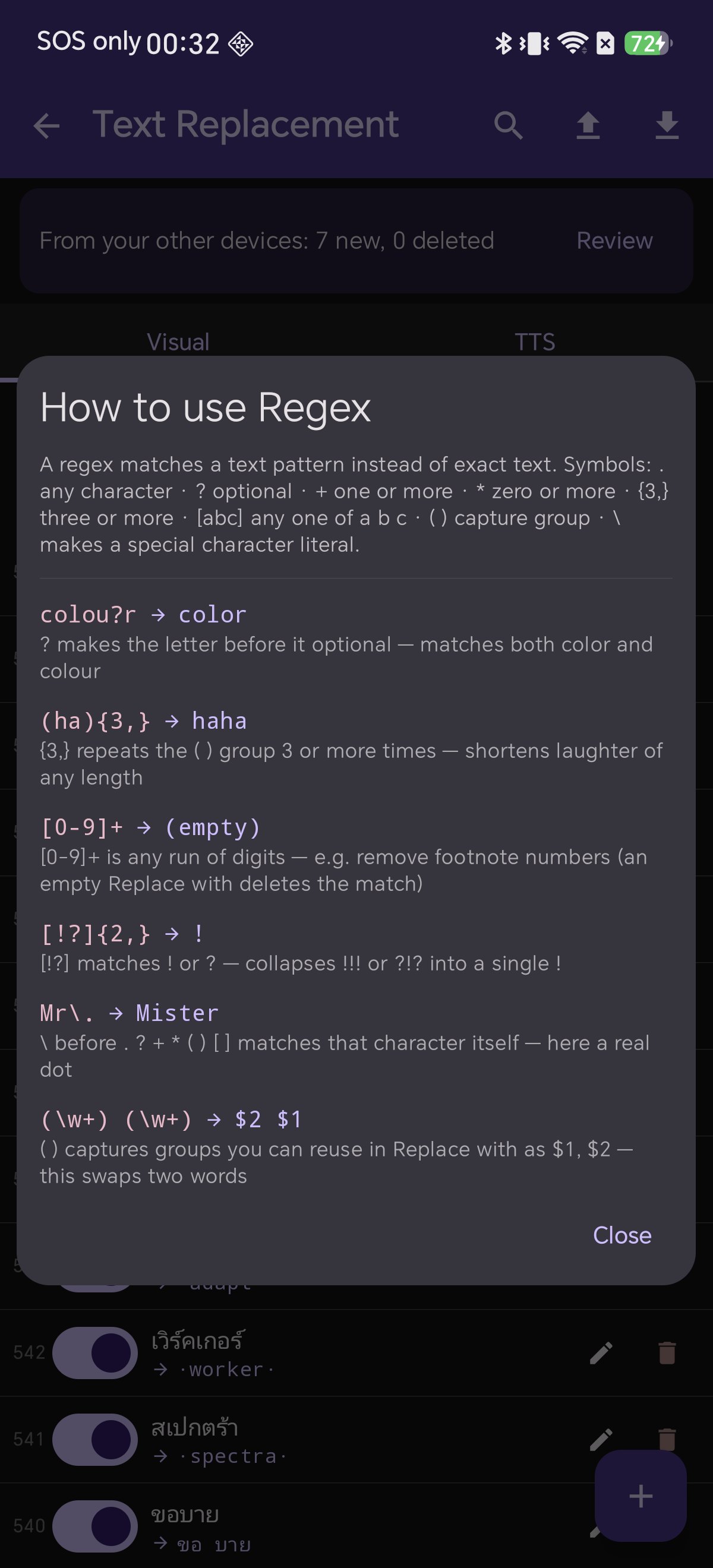
The 6 examples built into Shiori's cheat sheet:
| Pattern | Replace with | What it does |
|---|
colou?r | color | ? makes the preceding letter optional (matches color and colour) |
(ha){3,} | haha | {3,} matches 3 or more repetitions (shortens long laughter) |
[0-9]+ | (empty) | matches any sequence of digits (empty replacement deletes them) |
[!?]{2,} | ! | collapses multiple punctuation marks like !!! into a single ! |
Mr\. | Mister | \ matches a literal dot rather than any character |
(\w+) (\w+) | $2 $1 | ( ) captures groups; $1 and $2 swap the two words |
Ten more practical recipes to steal:
| Pattern | Replace with | What it does |
|---|
\[[0-9]+\] | (empty) | removes footnote markers like [12] |
\s{2,} | (one space) | collapses excessive spaces into one |
Dr\. | Doctor | expands abbreviations for natural TTS speech |
St\. | Saint | expands titles (matches St.) |
— | , | turns em dashes into commas for natural TTS pauses |
\.\.\. | … | converts three dots into a proper ellipsis |
([a-z])([A-Z]) | $1 $2 | splits merged words from poor OCR scans |
^\s+ | (empty) | trims leading paragraph spaces |
(\d+)th | $1 th | improves TTS pronunciation of ordinal numbers |
\bch\. | chapter | \b anchors to word boundaries (won't match mulch) |
ตัวอย่างสูตรลัด 6 รูปแบบที่มีอยู่ในแอป:
| Pattern (สูตรค้นหา) | Replace with (คำแทนที่) | ผลลัพธ์การทำงาน |
|---|
colou?r | color | ? ทำให้ตัวอักษรข้างหน้ามีหรือไม่มีก็ได้ (จับคู่ทั้ง color และ colour) |
(ha){3,} | haha | {3,} จับคู่คำซ้ำตั้งแต่ 3 ครั้งขึ้นไป (ย่อเสียงหัวเราะยาวๆ ให้สั้นลง) |
[0-9]+ | (เว้นว่าง) | จับคู่ตัวเลขทุกจำนวน (เว้นว่างไว้เพื่อลบตัวเลขทิ้ง) |
[!?]{2,} | ! | ยุบเครื่องหมายตกใจหรือคำถามซ้ำๆ เช่น !!! ให้เหลือเพียง ! ตัวเดียว |
Mr\. | Mister | \ ระบุให้จับคู่จุดจริง ไม่ใช่เครื่องหมายแทนตัวอักษรใดๆ |
(\w+) (\w+) | $2 $1 | ( ) จับกลุ่มคำ; $1 และ $2 นำมาสลับตำแหน่งคำกัน |
อีก 10 สูตรยอดนิยมที่นำไปใช้ได้ทันที:
| Pattern | Replace with | ผลลัพธ์การทำงาน |
|---|
\[[0-9]+\] | (เว้นว่าง) | ลบหมายเลขเชิงอรรถในวงเล็บ เช่น [12] |
\s{2,} | (เว้นวรรค 1 เคาะ) | ยุบช่องว่างที่เว้นวรรคซ้ำซ้อนให้เหลือเคาะเดียว |
Dr\. | Doctor | ขยายคำย่อให้เสียงอ่าน TTS พูดเต็มคำอย่างถูกต้อง |
St\. | Saint | ขยายคำย่อตำแหน่งหรือชื่อนักบุญ |
— | , | เปลี่ยนขีดยาว Em Dash เป็นจุลภาคเพื่อให้ TTS เว้นจังหวะหายใจอย่างเป็นธรรมชาติ |
\.\.\. | … | แปลงจุดไข่ปลา 3 จุดให้เป็นสัญลักษณ์จุดละแบบมาตรฐาน |
([a-z])([A-Z]) | $1 $2 | แยกคำภาษาอังกฤษที่ติดกันจากไฟล์สแกน OCR |
^\s+ | (เว้นว่าง) | ลบช่องว่างส่วนเกินที่อยู่ต้นย่อหน้า |
(\d+)th | $1 th | ช่วยให้เสียงอ่านลำดับที่ (เช่น 14th) อ่านได้ถูกต้องชัดเจนขึ้น |
\bch\. | chapter | \b ระบุขอบเขตคำขึ้นต้น เพื่อไม่ให้ไปโดนคำอื่น |
アプリ内チートシートに収録されている6つの基本例:
| Pattern(検索パターン) | Replace with(置換文字列) | 動作と解説 |
|---|
colou?r | color | ? で直前の文字を省略可能に(color と colour 両方に一致) |
(ha){3,} | haha | {3,} で3回以上の繰り返しを短縮(長すぎる笑い声を整理) |
[0-9]+ | (空欄) | 連続する数字を検出(空欄指定で数字を一括削除) |
[!?]{2,} | ! | !!! などの連続した感嘆符を1つの ! に集約 |
Mr\. | Mister | \ でピリオドそのものを正確にエスケープ指定 |
(\w+) (\w+) | $2 $1 | ( ) でグループをキャプチャし、$1 と $2 で前後を入れ替え |
さらに便利な10の実践レシピ:
| Pattern | Replace with | 動作と解説 |
|---|
\[[0-9]+\] | (空欄) | [12] などの脚注番号記号をまとめて削除 |
\s{2,} | (半角スペース1つ) | 余分な連続空白を1つのスペースに統合 |
Dr\. | Doctor | TTSがアルファベット読みしてしまう略語を展開 |
St\. | Saint | 聖人や称号の略語を展開 |
— | , | ダッシュを読点やカンマに変えてTTSに自然な間を作らせる |
\.\.\. | … | 3つのピリオドを正式な三点リーダー記号に変換 |
([a-z])([A-Z]) | $1 $2 | OCR読み取りミスで連結した英単語を適切に分離 |
^\s+ | (空欄) | 行頭の余分な空白を除去 |
(\d+)th | $1 th | 序数(14th等)のTTS発音の乱れを防止 |
\bch\. | chapter | \b で単語の先頭に限定し誤置換を防止 |
内置速查表中的 6 条经典正则范例:
| Pattern(匹配模式) | Replace with(替换内容) | 效果与说明 |
|---|
colou?r | color | ? 使前一字符变为可选(同时匹配 color 与 colour) |
(ha){3,} | haha | {3,} 匹配重复 3 次以上的笑声并予以精简 |
[0-9]+ | (留空) | 匹配任意连续数字(留空即可批量删除) |
[!?]{2,} | ! | 将 !!! 等重复标点合并为一个 ! |
Mr\. | Mister | \ 精准转义匹配真实的英文句号 |
(\w+) (\w+) | $2 $1 | ( ) 捕获词组,利用 $1 与 $2 调换词语顺序 |
10 条极具价值的实战拓展规则:
| Pattern | Replace with | 效果与说明 |
|---|
\[[0-9]+\] | (留空) | 清除正文中形如 [12] 的脚注上标 |
\s{2,} | (单个空格) | 将连续的多余空格合并为标准单空格 |
Dr\. | Doctor | 展开英文缩写,使语音朗读更自然 |
St\. | Saint | 展开头衔缩写 |
— | , | 将破折号转为逗号,引导 TTS 生成自然停顿 |
\.\.\. | … | 将三连点替换为规范的省略号 |
([a-z])([A-Z]) | $1 $2 | 修复 OCR 扫描导致的英文粘连单词 |
^\s+ | (留空) | 去除段落首行的多余空格 |
(\d+)th | $1 th | 修正序数词朗读节奏 |
\bch\. | chapter | \b 单词边界匹配,避免误伤其他词汇 |
Os 6 exemplos integrados ao guia rápido:
| Pattern | Replace with | O que faz |
|---|
colou?r | color | ? torna a letra anterior opcional |
(ha){3,} | haha | {3,} encurta risadas longas repetidas |
[0-9]+ | (vazio) | localiza números (substituição vazia exclui) |
[!?]{2,} | ! | unifica pontuações repetidas como !!! |
Mr\. | Mister | \ escapa o ponto literal |
(\w+) (\w+) | $2 $1 | inverte a posição de duas palavras capturadas |
Mais 10 receitas práticas:
| Pattern | Replace with | O que faz |
|---|
\[[0-9]+\] | (vazio) | remove marcas de notas como [12] |
\s{2,} | (um espaço) | remove espaços duplicados |
Dr\. | Doutor | expande abreviações para o TTS |
St\. | Santo | expande títulos |
— | , | converte travessões em pausas de vírgula para o TTS |
\.\.\. | … | substitui três pontos por reticências tipográficas |
([a-z])([A-Z]) | $1 $2 | corrige palavras coladas por erro de OCR |
^\s+ | (vazio) | remove espaços no início do parágrafo |
(\d+)th | $1 th | melhora a pronúncia de numerais ordinais |
\bch\. | capítulo | \b limita ao início da palavra |
Los 6 ejemplos integrados en la chuleta de Shiori:
| Pattern | Replace with | Qué hace |
|---|
colou?r | color | ? hace que la letra anterior sea opcional |
(ha){3,} | haha | {3,} acorta risas repetitivas |
[0-9]+ | (vacío) | encuentra números (reemplazo vacío los borra) |
[!?]{2,} | ! | reduce signos repetidos como !!! a uno solo |
Mr\. | Mister | \ escapa el punto literal |
(\w+) (\w+) | $2 $1 | intercambia el orden de dos palabras |
10 recetas útiles adicionales:
| Pattern | Replace with | Qué hace |
|---|
\[[0-9]+\] | (vacío) | elimina notas al pie como [12] |
\s{2,} | (un espacio) | reduce espacios excesivos a uno solo |
Dr\. | Doctor | despliega abreviaturas para la narración |
St\. | San | despliega títulos |
— | , | convierte rayas en comas para generar pausas naturales |
\.\.\. | … | convierte tres puntos en puntos suspensivos tipográficos |
([a-z])([A-Z]) | $1 $2 | separa palabras unidas por fallos de OCR |
^\s+ | (vacío) | elimina espacios al inicio de párrafo |
(\d+)th | $1 th | optimiza la lectura de ordinales |
\bch\. | capítulo | \b fija el inicio de palabra para evitar falsos positivos |
Does a text replacement rule modify my actual EPUB file?
No. Rules are applied dynamically in memory when a chapter renders or when text is sent to the TTS voice. The actual file on your device remains completely untouched, and deleting a rule restores the original text immediately.
การแทนที่ข้อความจะไปแก้ไขไฟล์ EPUB ต้นฉบับหรือไม่?
ไม่เลยครับ กฎทั้งหมดจะทำงานในหน่วยความจำชั่วคราวขณะแสดงผลหน้าหนังสือหรือขณะสังเคราะห์เสียงอ่านเท่านั้น ไฟล์หนังสือจริงในเครื่องจะไม่ถูกแก้ไขใดๆ และเมื่อลบกฎออก ข้อความเดิมจะกลับคืนมาทันที
置換ルールによってEPUBファイル本体は変更されますか?
いいえ、一切変更されません。ルールは画面描画や音声出力の瞬間にメモリ上で適用されます。端末内のファイルは常に保護されており、ルールを削除すれば一瞬で元の表記に戻ります。
文本替换规则会修改 EPUB 源文件吗?
完全不会。所有规则仅在内存渲染与语音合成时实时生效,手机中保存的图书源文件始终保持原样,删除规则即可即刻恢复原文。
A regra de substituição altera o arquivo EPUB real?
Não. As regras operam em tempo real durante a exibição ou leitura em voz alta. O arquivo no disco permanece intacto.
¿Modifica el reemplazo el archivo EPUB original?
No. Las reglas se ejecutan en memoria durante la lectura o reproducción de voz. El archivo permanece inalterado.
Can a replacement rule apply to only one specific book?
Rules are designed to be global across your entire library for maximum convenience. You can use the row toggle switch to easily disable a rule when reading books that don't need it.
สามารถตั้งกฎให้มีผลเฉพาะหนังสือบางเล่มได้ไหม?
ระบบออกแบบให้กฎมีผลทั่วทั้งคลังหนังสือเพื่อความสะดวกรวดเร็วครับ หากมีกฎเฉพาะสำหรับบางเล่ม คุณสามารถแตะสวิตช์เปิด/ปิดหน้าแถวกฎเพื่อพักการใช้งานเมื่ออ่านเล่มอื่นได้ง่ายๆ
特定の1冊だけにルールを適用できますか?
ルールはライブラリ全体で共有される仕様です。不要な本を読む際は、ルール行のスイッチで一時的にOFFにしておくのが便利です。
规则可以仅对某一本书生效吗?
规则采用全局生效机制以提升管理效率。若某条规则仅适用于特定书籍,可通过该行开关随时停用或启用。
Posso aplicar uma regra apenas a um livro específico?
As regras são globais na biblioteca. Use o interruptor da linha para desativar temporariamente quando ler outras obras.
¿Puedo aplicar una regla solo a un libro concreto?
Las reglas son globales en tu biblioteca. Puedes usar el interruptor de fila para pausar una regla cuando leas otros títulos.
Are replacement rules case-sensitive?
Yes, both plain text and regex rules are case-sensitive. Enter the exact casing you want, or use regex character classes such as [Tt]he to match both capitalized and lowercase variations.
กฎการแทนที่คำนึงถึงตัวพิมพ์เล็ก-ใหญ่หรือไม่?
คำนึงถึงครับ (Case-sensitive) ทั้งข้อความธรรมดาและ Regex หากต้องการให้จับคู่ทั้งตัวเล็กและตัวใหญ่ สามารถใช้สูตรอย่าง [Tt]he ได้ครับ
大文字と小文字は区別されますか?
はい、プレーン・正規表現ともに大文字小文字を区別します。両方に一致させたい場合は [Tt]he のように文字クラスをご活用ください。
规则是否区分英文字母大小写?
是的,普通规则与正则规则均区分大小写。如需同时匹配首字母大写与小写,可使用 [Tt]he 等字符集写法。
As regras diferenciam maiúsculas de minúsculas?
Sim. Para cobrir ambas as formas, use classes de caracteres como [Tt]he.
¿Se distinguen mayúsculas y minúsculas?
Sí. Para incluir ambas variantes, puedes recurrir a patrones como [Tt]he.
How do I delete unwanted text instead of replacing it?
Simply leave the Replace with field completely empty. Every match of your find pattern will be cleanly removed — ideal for stripping footnote markers like [12].
ถ้าต้องการลบคำที่ไม่ต้องการทิ้งโดยไม่แทนที่ด้วยอะไรเลย ต้องทำอย่างไร?
เพียงปล่อยช่อง Replace with ให้ว่างไว้ครับ ข้อความที่ตรงกับเงื่อนไขจะถูกลบทิ้งทั้งหมด ซึ่งเป็นวิธีที่นิยมมากในการลบหมายเลขเชิงอรรถอย่าง [12]
置換ではなく、不要な文字列を削除したい場合は?
Replace with 欄を完全に空欄にしてください。一致した文字列がきれいさっぱり削除されます([12] のような脚注番号の削除に最適です)。
如何直接删除不需要的文字而非替换?
只需将 Replace with 栏完全留空即可。所有匹配项将被彻底移除,非常适合消除 [12] 这类脚注标记。
Como excluir texto indesejado em vez de substituir?
Basta deixar o campo Replace with totalmente vazio. O texto correspondente será removido da leitura.
¿Cómo elimino texto no deseado en lugar de reemplazarlo?
Deja el campo Replace with completamente en blanco. Toda coincidencia será eliminada del texto.
Your Books, in Your Words
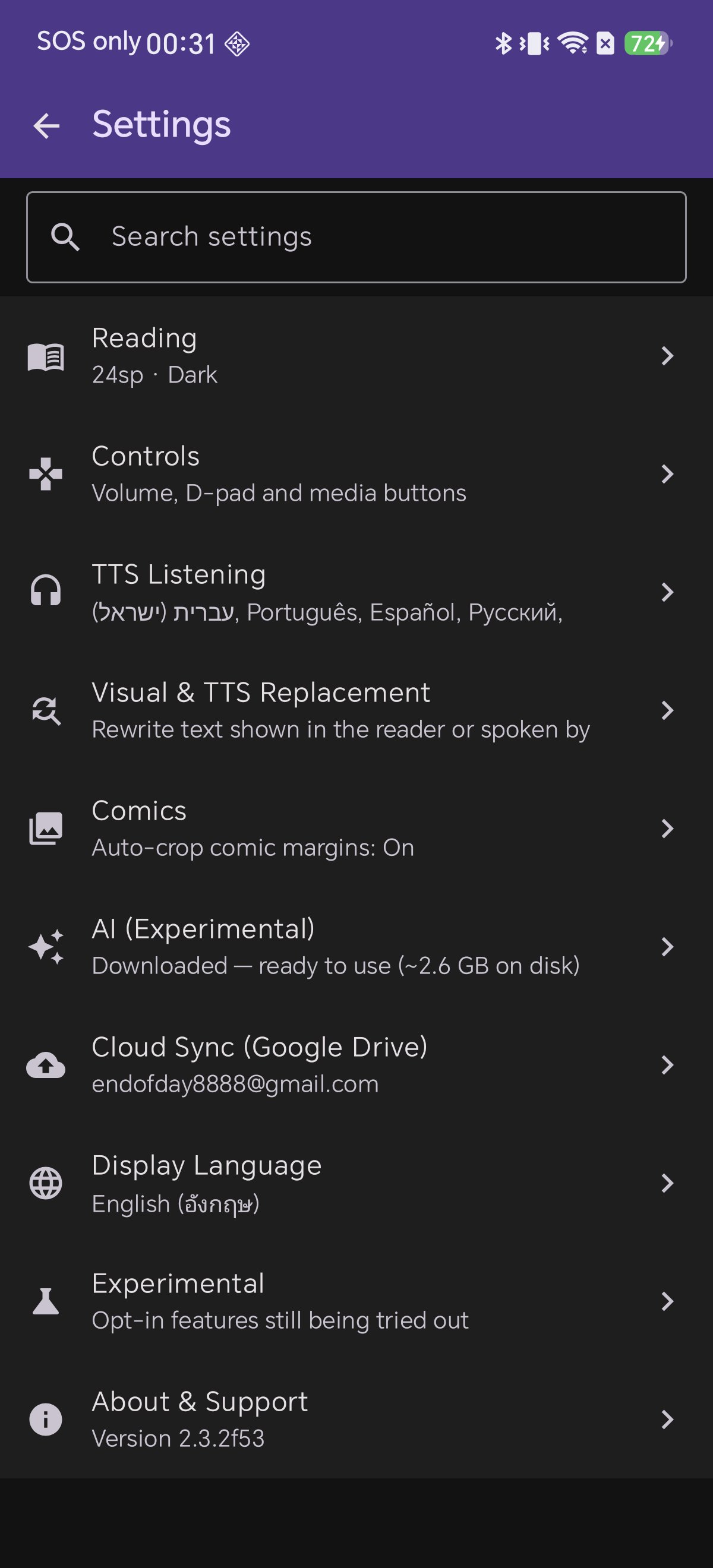
Download Shiori EPUB Reader, open Settings → Visual & TTS Replacement, and tailor every line to your personal reading taste.
อ่านและฟังหนังสือ ในแบบที่เป็นคุณ
ดาวน์โหลด Shiori EPUB Reader วันนี้ เปิดเมนู Visual & TTS Replacement แล้วปรับแต่งประสบการณ์การอ่านและฟังให้สมบูรณ์แบบที่สุด
本の世界を、もっとあなたらしく
Shiori EPUB リーダーをダウンロードし、テキスト置換機能を活用して、ストレスフリーな読書と朗読の世界を手に入れましょう。
让每一本书都更契合您的心意
立即下载 Shiori EPUB 阅读器,开启 Visual & TTS 文本替换,随心定制专属的视觉与听书体验。
Seus Livros, do Seu Jeito
Baixe o Shiori EPUB Reader, acesse a Substituição de Texto e personalize cada palavra lida e ouvida.
Tus Libros, a Tu Medida
Descarga Shiori EPUB Reader, accede al Reemplazo de Texto y adapta cada palabra leída y escuchada a tu gusto.